Summary
- Skyvia. A flexible integration platform for finance and ERP teams that need clean accounting data, custom mappings, and reliable sync between ERPs, CRMs, and data warehouses without writing code.
- Celigo. Well-suited for mid-market ERP integrations, particularly around NetSuite, with prebuilt flows that speed up common finance and operations use cases.
- Workato. A powerful automation-first platform that blends ERP integrations with business workflows, appealing to teams that want finance data to trigger actions across the organization.
- Jitterbit. A solid integration platform for connecting ERPs, CRMs, and financial systems, often chosen for hybrid environments where cloud and on-prem systems need to work together.
- MuleSoft. A heavyweight integration and API platform designed for large enterprises that require deep customization, API-led connectivity, and tight control over complex financial systems.
Finance and ERP data rarely fall apart all at the same time.
It usually starts small:
- A few numbers copied by hand.
- A report patched together in Excel.
- A late close because one system did not line up with another.
Over time, those workarounds stack up. Teams spend more resources reconciling data than actually using it, errors creep in unnoticed, and leadership ends up making decisions on delayed or slightly off numbers.
Data integration tools step in exactly at that point. They automate the flow of data between finance apps, ERPs, and other related solutions, so information moves where it should without manual handoffs. Instead of chasing updates and fixing mismatches, teams can rely on consistent, up-to-date data showing up on time across accounting, reporting, and operations.
In this article, we take a closer look at the best data integration tools for finance and ERP in 2026. We break down what each platform is best at, where it fits, and how to choose the right option based on your scale, complexity, and long-term growth plans.
Table of Contents
- What Are Data Integration Tools and Why Are They Crucial for Finance and ERP?
- Key Features to Look for in a Data Integration Tool for Finance and ERP
- The 10 Best Data Integration Tools for Finance and ERP
- Comparison Table of the Best Data Integration Tools for Finance and ERP
- How to Choose the Right Tool for Your Business
- Conclusion
What Are Data Integration Tools and Why Are They Crucial for Finance and ERP?
At a basic level, data integration tools are software platforms that pull data from different systems and line everything up into one consistent view. Instead of storing finance data in one place, ERP data in another, and stitching reports together manually, everything flows into a shared structure that actually makes sense. The goal is simple: just stop moving data by hand and let systems talk to each other directly.
For finance and ERP, it’s the difference between reacting to problems late and seeing them early.
Improved Data Accuracy and Consistency
Manual data entry always means added up over time, and a lot of mistakes, like:
- Copy-paste errors.
- Outdated values.
- Mismatched IDs.
When finance and ERP systems are connected properly, data moves automatically and stays aligned across platforms. Numbers match, records stay in sync, and teams spend far less time reconciling things that should have lined up in the first place.
Enhanced Decision-Making
When data updates in near real time, decision-making changes completely. You’re no longer working off last week’s reports or partial snapshots. Instead, finance leaders get a clear, current view of cash flow, revenue, expenses, and operational metrics in one place. That holistic picture makes it easier to spot trends early and act before small issues turn into big ones.
Increased Efficiency
A lot of finance work still revolves around tasks that don’t really move the business forward:
- Invoicing.
- Reporting.
- Data reconciliation.
Integration tools automate those workflows so they run in the background. Teams close tasks faster, reports get delivered on time. So, people can focus on analysis and planning and forget about repetitive busywork.
Better Compliance and Security
Financial data needs to be handled carefully. Ad-hoc processes rarely meet that standard.
Integration platforms help users enforce consistent data handling, access controls, and audit trails across systems. With data flowing through defined pipelines instead of spreadsheets and emails, it’s easier to stay compliant and keep sensitive information locked down.
Key Features to Look for in a Data Integration Tool for Finance and ERP
Before you pick any integration tool for finance or ERP, it’s worth knowing what really matters. These systems deal with money, compliance, and business-critical operations, so the margin for error is basically zero. Here’s what you want to keep an eye on when evaluating tools, explained the way you’d hear it over a coffee, not in a vendor brochure.
Extensive Connector Library
The faster you can connect the systems, the sooner you see value. A solid integration tool should come with ready-to-use connectors for common finance apps like QuickBooks, Xero, and Stripe, as well as heavy-hitters on the ERP side such as SAP, Oracle NetSuite, and Microsoft Dynamics. Pre-built connectors save weeks of setup and reduce the risk that critical data gets lost in translation.
Ease of Use (Low-Code or No-Code)
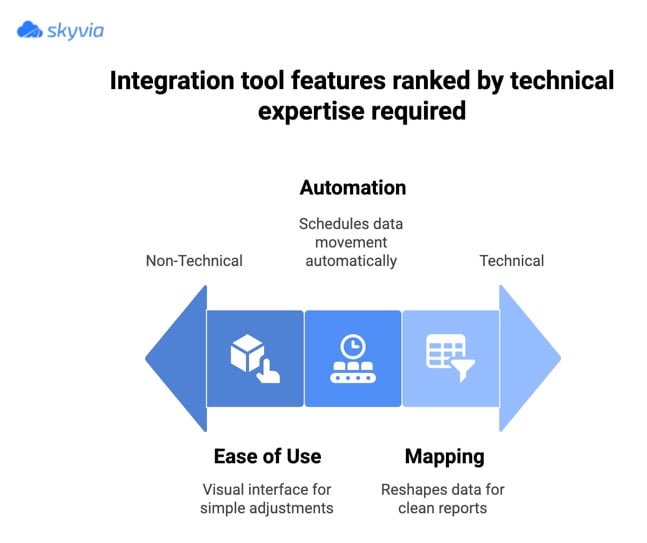
Finance teams are busy enough and shouldn’t have to rely on engineers for every small change. A clean visual interface allows users to build, adjust, and monitor integrations without digging into code.
The best tools strike a balance here:
- Powerful for technical users.
- Approachable, so non-technical teams can handle everyday tweaks without fear of breaking things.
Security and Compliance
This is finance and ERP data. Here, users take a lot of important data, like invoices, payroll, customer records, transactional history, and maybe even health-related billing info. Security can’t be an afterthought.
Look for encryption everywhere, strong access controls, audit trails, and proper certifications like SOC 2, GDPR, and HIPAA.
If the tool can’t tick those boxes, it shouldn’t even make your shortlist.
Scalability
What works at a few thousand records a day can fall apart quickly at scale. A reliable platform should comfortably handle higher volumes, more frequent syncs, and additional connections without slowing down or getting brittle.
In short, it should grow alongside your business, not force a rebuild every time you add a new system.
Advanced Mapping and Transformation Capabilities
No two finance or ERP systems structure data the same way. Strong mapping and transformation tools let you reshape data as it moves:
- Converting formats.
- Normalizing fields.
- Applying business logic on the fly.
This is what keeps reports clean and downstream systems happy without endless manual cleanup.
Automation and Scheduling
The whole point of integration is to stop thinking about it. Scheduling and automation features ensure data moves at the right time, in the right order, without someone hitting refresh. Whether it’s hourly syncs, nightly reconciliation, or event-based triggers, automation keeps everything running in the background while teams focus on higher-value work.
The 10 Best Data Integration Tools for Finance and ERP
Skyvia
Skyvia is a universal cloud data platform designed to make finance and ERP integrations less painful and far more predictable. It combines no-code simplicity with enough depth to handle real-world complexity, which makes it a strong fit for both growing businesses and mature teams. You can start small, then gradually build more advanced integrations without switching platforms.
Key Features for Finance and ERP
- Visual, no-code data mapping and transformation.
- Support for data import, synchronization, and replication.
- Secure cloud architecture with strong access controls.
- Flexible handling of scheduled and automated data flows.
- 200+ pre-built connectors not only for major finance apps and ERP systems.
Pros
- User-friendly setup and management not needing deep technical skills.
- Affordable compared to enterprise-only integration platforms.
- Scales smoothly as data volumes and integration complexity increase.
- Works well for both simple syncs and more advanced scenarios.
Cons
- Advanced transformations and multi-step logic can take time to master.
- Power users may need some onboarding to unlock the full feature set.
Pricing
Skyvia provides a freemium model, which makes it easy to test with real data before committing. Paid plans are split into clear pricing tiers based on usage and features, giving teams room to scale without sudden cost jumps.

Celigo
Cellgo is built around preconfigured integration flows and might be the go-to option when NetSuite sits at the center of the finance and operations stack. It’s attractive for teams that want to get integrations up and running quickly without engineering everything from scratch.
Key Features for Finance and ERP
- Prebuilt integration flows for NetSuite, Salesforce, Shopify, and other finance-related systems.
- Strong support for order-to-cash and quote-to-cash processes.
- Built-in error handling, monitoring, and retry logic.
- Visual flow designer for adjusting mappings and rules.
- Support for scheduled and event-driven integrations.
Pros
- Fast setup for common NetSuite-centric use cases.
- Clear structure for finance and ERP workflows.
- Good visibility into sync status and integration errors.
- Reduces the need for custom scripting in many scenarios.
Cons
- Less flexible outside predefined flows.
- Can get expensive as integrations scale out.
- Not ideal if NetSuite is not a key system in your stack.
Pricing
Celigo doesn’t publish fixed pricing. Costs are typically based on the number of integrations, flows, and data volume, which works well at mid-scale but can add up as usage grows.
Workato
Workato sits at the intersection of data integration and business automation. It’s a strong fit for teams that want finance and ERP data to do more than move from point A to point B. Instead, it acts as a trigger for workflows, approvals, and cross-team processes once the numbers change.
Key Features for Finance and ERP
- Large connector library covering ERP, finance, CRM, and productivity tools.
- Event-driven automation that reacts to changes in financial data.
- Visual recipe builder for designing workflows and integrations.
- Built-in governance, access control, and monitoring.
- Support for complex, multi-step business processes.
Pros
- Excellent for connecting finance data with operational workflows.
- Strong automation capabilities beyond basic data sync.
- Scales well in larger organizations with multiple teams included.
Cons
- Overkill for simple finance or ERP integrations.
- Higher cost compared to data-only integration tools.
- To avoid overcomplicated workflows, requires upfront planning.
Pricing
Workato pricing is based on usage and automation volume rather than flat tiers. It’s typically positioned at the higher end and is best suited for teams that plan to make automation a core part of their finance operations.
Jitterbit
Jitterbit is a good solution when a company’s finance and ERP setup is split between cloud apps and old-school on-prem systems.
Instead of gluing everything together with custom scripts and hope, Jitterbit steps in to make all those systems actually talk to each other. It’s a solid fit for teams that need real integration muscle but don’t want to dive into a huge, enterprise-heavy platform.
Key Features for Finance and ERP
- Prebuilt connectors for ERP, finance, CRM, and databases.
- Support for cloud, on-prem, and hybrid integration scenarios.
- Visual design tools backed by scripting for complex logic.
- Robust API management and orchestration capabilities.
- Centralized monitoring and error handling.
Pros
- Strong for API-driven finance and ERP integrations.
- Handles hybrid environments.
- Balances visual setup with deeper technical control depending on the user’s need.
Cons
- A bit crowded interface at first glance.
- Requires more technical involvement than no-code tools.
- Licensing can get pricey as usage grows.
Pricing
Jitterbit runs on subscription pricing that varies based on how many connectors you need, how many environments you’re running, and the amount of data you’re moving. It’s not the bargain option in the market, but it makes sense for teams that outgrow simple plug-and-play tools and need something more flexible.
Informatica
Informatica is one of those platforms you usually grow into. It solves pains of organizations having complex finance data, multiple ERPs, and strict governance rules. If data quality, lineage, and control sit high on your priority list, Informatica tends to check those boxes.
Key Features for Finance and ERP
- Broad connector coverage for enterprise ERPs, finance systems, and data platforms.
- Advanced data quality, cleansing, and enrichment capabilities.
- Strong governance, metadata management, and data lineage.
- Support for cloud, on-prem, and hybrid architectures.
- Powerful transformation and orchestration tools for complex pipelines.
Pros
- Very strong data governance and quality controls.
- Handles complex finance and ERP environments at scale.
- Well suited for regulated industries and large enterprises.
- Mature ecosystem with deep functionality.
Cons
- Steeper learning curve compared to lighter solutions.
- Can feel heavy for smaller teams or simple use cases.
- Higher total cost of ownership.
Pricing
The pricing here is focused on the enterprises and typically customized. Costs vary based on modules, data volume, and deployment model, which makes it a better fit for large organizations with long-term integration strategies.
MuleSoft
MuleSoft is the heavyweight in this space. Teams usually turn to it when finance and ERP integrations go far beyond simple data sync and start looking more like a full integration architecture. It shines in environments where APIs, custom logic, and tight system control are must-haves.
Key Features for Finance and ERP
- API-led connectivity for ERPs, finance systems, and internal services.
- Strong tooling for building, managing, and securing APIs.
- Support for complex orchestration and transformation logic.
- Enterprise-grade security, governance, and monitoring.
- Scales well across large, distributed system landscapes.
Pros
- Extremely flexible for custom finance and ERP integrations.
- Excellent for API-first and microservices-driven setups.
- Strong security and governance controls.
- Handles very complex, enterprise-scale architectures.
Cons
- Overkill for straightforward integration needs.
- Steep learning curve without dedicated technical resources.
- High cost compared to lighter integration tools.
Pricing
MuleSoft follows enterprise pricing. Usually it’s based on cores or usage. Costs can add up quickly, which makes it best suited for large organizations with complex requirements and long-term integration roadmaps.
Boomi
Boomi has been around long enough to earn its reputation in enterprise integration. It’s often the safe, well-understood choice when finance and ERP data need to move reliably between cloud apps and older on-prem systems. If your setup isn’t simple and probably never will be, Boomi tends to feel familiar for the right reasons.
Key Features for Finance and ERP
- Broad connector library covering ERPs, finance platforms, and legacy systems.
- Strong support for hybrid and on-prem integrations.
- Visual process builder with data mapping and transformations.
- Built-in monitoring, error handling, and retry logic.
Pros
- Reliable and battle-tested in large organizations.
- Handles hybrid environments very well.
- Good balance between visual tooling and technical depth.
Cons
- Compared to newer tools, the interface may not seem so up to date.
- Licensing and pricing look complex.
- Not a good option for simple use cases.
Pricing
Boomi pricing is subscription-based and typically tied to connectors, environments, and usage. It’s positioned for mid-to-large organizations and usually makes sense when integration is a long-term strategic investment rather than a quick fix.
Talend
When the organizations want deep control over data movement and transformation, especially on the analytics and reporting side of finance, Talend is a strong pick. It’s often used by companies that treat data pipelines as a core part of their stack and are comfortable getting a bit more hands-on.
Key Features for Finance and ERP
- Extensive connector library for databases, ERPs, and finance systems.
- Powerful data transformation and enrichment tools.
- Strong focus on data quality and validation.
- Supports cloud, on-prem, and hybrid deployments.
Pros
- The solution is flexible for complex data transformations.
- Strong data quality features built into pipelines.
- Well-suited for finance analytics and reporting workloads.
- Large community and mature ecosystem.
Cons
- More technical than low-code integration platforms.
- Setup and maintenance can take time.
- Not ideal for teams looking for quick, no-code setups.
Pricing
Talend provides the enterprise pricing that depends on deployment and feature set, making it a better fit for teams that value flexibility and customization over speed of setup.
The open-source edition is also available.
Microsoft Azure Data Factory
Azure Data Factory is a natural choice when your finance and ERP data already lives in the Microsoft ecosystem. It’s more about building solid, repeatable pipelines that move data reliably into analytics platforms, data warehouses, or downstream systems and less about plug-and-play simplicity.
Key Features for Finance and ERP
- Native integration with Azure services and Microsoft data platforms.
- Broad connector support for databases, ERPs, and SaaS finance tools.
- Visual pipeline builder with support for complex workflows.
- Strong scheduling, monitoring, and logging capabilities.
- Scales easily for large data volumes and frequent loads.
Pros
- Fits perfectly into Azure-first environments.
- Very scalable for finance reporting and analytics workloads.
- Strong orchestration and scheduling features.
- Reliable for batch-based and recurring data movement.
Cons
- Not designed for real-time or bi-directional sync use cases.
- Steeper learning curve for non-technical users.
- Requires Azure knowledge to get the most out of it.
Pricing
Azure Data Factory uses consumption-based pricing. You pay for pipeline runs, data movement, and execution time, which keeps entry costs low but requires monitoring as usage scales.
SAP Integration Suite
SAP Integration Suite is the obvious pick when SAP sits at the core of your finance and ERP world. It’s built to keep SAP systems talking cleanly with both SAP and non-SAP applications, without forcing teams to bolt on a separate integration layer.

Key Features for Finance and ERP
- Native, deep integrations with SAP S/4HANA, SAP ECC, and SAP finance tools.
- Prebuilt integration content and templates for common SAP scenarios.
- API management, event-driven integrations, and message-based processing.
- Cloud-based deployment within the SAP ecosystem.
Pros
- Best-in-class integration for SAP-centric environments.
- Tight alignment with SAP security and governance models.
- Reduces friction when extending SAP to other systems.
- Backed by SAP’s long-term product roadmap.
Cons
- Limited flexibility outside SAP-heavy stacks.
- Can feel complex for teams new to SAP tooling.
- Less appealing if SAP is only a small part of the landscape.
Pricing
SAP Integration Suite is a part of SAP cloud subscriptions. The pricing depends on usage, resources, and integration volume, which makes it most practical for organizations already invested in SAP as their core ERP platform.
Comparison Table of the Best Data Integration Tools for Finance and ERP
| Tool | Best for | Usability Model | Key Connectors | Pricing Mode |
|---|---|---|---|---|
| Skyvia | Finance and ERP teams that want flexibility without heavy engineering. | No-Code / Low-Code. | QuickBooks, Xero, Stripe, NetSuite, Salesforce, databases. | Freemium + tiered plans. |
| Celigo | NetSuite-first finance and operations workflows. | Low-Code. | NetSuite, Shopify, Salesforce, ERPs. | Usage-based, quote-driven. |
| Workato | Automating finance-driven business workflows. | Low-Code. | ERP, finance, CRM, productivity apps. | Usage-based enterprise pricing. |
| Jitterbit | Hybrid cloud and on-prem ERP environments. | Low-Code / Code-Optional. | ERPs, databases, CRMs, APIs. | Subscription-based. |
| Informatica | Large enterprises with governance-heavy finance data. | Code-Heavy. | SAP, Oracle, enterprise data platforms. | Custom enterprise pricing. |
| MuleSoft | API-led, highly customized ERP architectures. | Code-Heavy. | ERP systems, APIs, internal services. | Core/usage-based enterprise pricing. |
| Boomi | Stable enterprise integrations across mixed environments. | Low-Code. | ERPs, finance apps, legacy systems. | Subscription-based. |
| Talend | Technical teams building custom data pipelines. | Code-Heavy. | Databases, ERPs, SaaS apps. | Open source + enterprise tiers. |
| Azure Data Factory | Azure-first analytics and batch data movement. | Code-Heavy. | Azure services, databases, SaaS apps. | Consumption-based. |
| SAP Integration Suite | SAP-centered ERP and finance landscapes. | Low-Code (SAP-focused). | SAP S/4HANA, ECC, SAP finance tools. | SAP subscription-based. |
How to Choose the Right Tool for Your Business
This is usually the part where teams overthink it. The trick is to focus more on what you actually need today, plus what you’re likely to need six or twelve months from now and less on vendor buzzwords. A few simple checks can narrow the field fast.
Assess Your Needs
Start with the basics:
- How much data moves around?
- What systems need to talk to each other, and how often?
A simple accounting sync isn’t the same as real-time inventory or multi-entity ERP data.
Be honest about the technical bench, too. Some tools assume you have engineers on standby; others are built for finance or ops teams to run on their own.
Consider Your Budget
The pricing area is where surprises often show up later. The models may vary a lot. Some tools seem affordable at first but become expensive as the data volume increases. Others cost more initially but stay predictable over time.
Map pricing to the usage patterns and ensure it lines up with how the business actually scales.
Evaluate Ease of Use
Look beyond demos and ask who will own the integrations day to day. Your team is the one living with this tool, not the sales rep.
If the interface feels confusing, clunky, or requires a week of onboarding, that’s a sign it may slow you down. Ideally, non-technical users should be able to handle basic jobs, while the technical team still has room to dive deeper when needed.
Check for Necessary Connectors
Ensure the tool has ready-made connectors for your core systems: ERP, finance apps, CRMs, databases, whatever you rely on.
If you need NetSuite, Stripe, and Snowflake to play nicely, but the platform only supports two of them, you’re already starting behind. Prebuilt connectors save users a ton of time and headaches.
Look for Scalability
Finally, think forward. Even if your data volumes are modest today, they won’t stay that way forever.
Choose something that won’t choke the moment your business grows, or another system joins the mix. A good platform should scale smoothly without forcing teams to rebuild everything from scratch.
Conclusion
When finance and ERP systems operate in isolation, teams end up spending more time fixing data than using it. Solid data integration changes that. It keeps numbers consistent, speeds up reporting, and gives finance leaders a clear view of what’s really going on across the business. At this point, integration isn’t a nice-to-have; it’s part of running finance at scale.
There’s no single “best” universal solution everyone may use. The right choice depends on:
- The data volume.
- How hands-on the team wants to be.
Some platforms lean toward heavy customization and deep technical control. Others focus on speed, simplicity, and flexibility. The key is matching the tool to how your business actually works today, with the room for increasing day by day.
If you’re looking for a platform that’s easy to start with, but strong enough to grow alongside the finance and ERP operations, Skyvia is a solid place to begin. You can try it for free, connect real systems, and see firsthand how clean, automated data flows can simplify your day-to-day work.

F.A.Q. for Data Integration Tools for Finance & ERP

Why is it so crucial to integrate financial and ERP data?
Disconnected systems lead to errors, delays, and messy reporting. Integration keeps numbers aligned and gives finance teams a clear, reliable view of the business.
What’s the difference between ETL and iPaaS for this purpose?
ETL focuses on moving and transforming data, usually for reporting. iPaaS handles ongoing system-to-system syncs and workflows across finance and ERP apps.
Are my financial details secure when using a data integration tool?
Reputable tools use encryption, access controls, and comply with standards like SOC 2 or GDPR to keep financial data protected end-to-end.
How much technical knowledge do I need to use these tools?
It depends on the tool. No-code and low-code platforms work well for non-technical users, while enterprise tools usually require more engineering support.
Can these tools connect my on-premise ERP system with cloud-based finance apps?
Yes. Many platforms support hybrid setups, allowing on-prem ERPs to sync securely with cloud accounting, billing, and reporting tools.