Summary
- Zero copy is a data access approach where one or more systems query the same governed data source through metadata and access layers, avoiding extra stored copies while keeping control, security, and freshness.
We had this situation since databases became a thing: Finance wants a different view of the data, marketing and sales have a different perspective, data scientists need to experiment, and developers need development and test environments. All of these more often produce copies of the production data. Finally, in 2026, we are drowning in duplicate copies. Some are intentional, others accidental. The result? More storage costs, compliance red flags, and “which version is the latest?” Then, there’s zero copy.
My eyebrows met when I first read of the concept. I thought, “Can duplicates really be avoided?” Read on what I found by applying it to data management, and why this is a promise to avoid the overwhelming number of duplicates within the same platform.
Table of Contents
- The Original Zero Copy: A Computer Science Perspective
- The Modern Zero Copy: A Data Integration Revolution
- How Does Zero Copy Integration Work?
- The Key Benefits of a Zero Copy Architecture
- Zero Copy in Action: Use Cases for Your Business
- The Future is Zero Copy: How Skyvia Fits In
- Conclusion
The Original Zero Copy: A Computer Science Perspective
Zero copy did not start from data management. Originally, it was applied to computer memory management – something complex that we thought others would handle for us. But the core principle is the same: use the data where it lives instead of making a new copy.
I’m not a C/C++ developer, but I learned a few stuff about it back in college. You don’t just make copies of values. You use a pointer — a tiny value that tells you where the real data lives in memory. Values in memory like a number, array, or whatnot, use pointers or memory references. It’s best to only have one place in memory to store one of these, then get the pointer to it when you need to use it – no extra copies, no waste, RAM conserved.
It’s like watching on Netflix. You don’t have the movie file; Netflix does. But your subscription is your “pointer” to the movie file. You can’t download the movie and share the file with someone else. This is the spirit of zero copy: share access, not duplicates.
The concept of zero copy extended deep in operating systems and other modern services when applicable. It’s being applied in data management today. They even coined terms like “zero copy integration” or “zero ETL”.

The Modern Zero Copy: A Data Integration Revolution
Zero copy in data management is a design pattern or technique that allows one or more consumers to read the same governed data source without making physical copies of it.
That’s the promise – avoid making copies.
When you make a copy of a data warehouse or at least copy portions of it, it needs additional storage. Whether it’s gigabytes or zettabytes, it still needs something to write on. If that’s in the cloud, it means you pay more for cloud storage. It’s not fun making copies when auditors and finance guys have their eyeballs on you.
Big names in data warehousing like Snowflake and BigQuery provide zero copy services for data warehouses you put in them. So, industry leaders have their full support for zero copy.
With zero copy, you access a single source of truth. Like a Netflix movie – one file, millions of viewers, no copies. There’s no need to create another pipeline for finance, apart from marketing and sales.
Sounds good?
Let’s dissect the definition further – and strip off the hype.
Zero Copy – What the Definition Really Tells You
I’ll give you the stuff hidden in the definition earlier.
“One or More Consumers”
Marketing, sales, finance, data science, engineering – even external vendors and clients will want to have access. It’s both internal and external consumers who can have a peek at your data.
“Governed Data Source”
Companies sharing data to partners or internal teams will safely share a copy of a data warehouse, lakehouse, or portions of data in their transactional database – all sensitive data stripped away.
Because most teams avoid exposing OLTP databases directly. I won’t in most cases, neither others who are thinking clearly.
Why?
- If you run a query with a heavy load on the transactional database, you will disrupt users’ day-to-day work by making their database slow (or slower). Zero copy only avoids copying, not offload your database server’s CPU and RAM.
- It’s a compliance red flag. Transactional databases contain personally identifiable information. There’s a risk of exposing or leaking them.
- I don’t want to be blamed, nor do you, when things go wrong.
What you can share is a sandbox or a separate environment that is also being updated – that is, a data warehouse or a lakehouse. Even then, not everything in it can be shared to partners depending on what’s in it.
If you’re thinking what I’m thinking at this point, there is no truly zero copy. A data warehouse contains data gathered from one or more data sources – already a copy of one or more transactional data. The same with lakehouses. If you dump a portion of your data into other formats, it’s also a copy.
So, if you ask me, it’s more of anti-copy, because we want to minimize copying. But “anti-copy” doesn’t favor marketing hype.
“Without Making Physical Copies”
This is where the objective of zero copy shines. The tech exists, so it tells us “Stop making copies, just let partners query them to their desired format.” There’s no need for a duplicate, a staging area, or a new ETL pipeline to produce it if it’s simple enough.
Before the cloud we know today existed, people mindlessly created copies of tables when someone requests some tabular reports or formatted data to them. This habit has been carried over to cloud platforms. So, one day, your nicely designed schema will have rogue tables like sales_finance, sales_temp, sales_latest, or whatever comes to their minds.
The result: More storage costs, more complexity to handle, more tables to clean, and harder to secure and govern access.
But zero copy is more of a mindset, in my opinion. The tech exists, but it’s not a guarantee that no one will make a copy. Moreover, while you can avoid copies of your data inside the same environment or platform, what do you think the receiving party will do? They may store it somewhere- another copy. You have no control as a data owner over what happens after your partners receive the shared data.
Zero copy is more to you as a data owner. It’s a guardrail to minimize copies of your own data. The receiving party? Not so much.
That’s our no-hype explanation of what zero copy is. It shines at some point. So, how does it work?

How Does Zero Copy Integration Work?
Zero copy lets another system query your data where it already lives without making physical copies of it. It uses metadata as pointers to describe where the data lives, which partitions or files to read, and which rows/columns are relevant.
It uses 3 core elements to make it work:
- Producer or Provider: This is where the actual tables live and where the data is shared through its metadata.
Example: Snowflake, BigQuery - Access Method: The interface that exposes the share to consumers. It enforces security, accepts queries, translate it to something the producer understands, and return results.
Example: OData or SQL Endpoint, Snowflake Direct Sharing, Foreign Data Wrappers (FDW) - Consumer: A system that uses the shared data.
Example: Another database using federated queries through FDW, BI tool, analytics engine.
Please examine the diagram below that describes these elements:
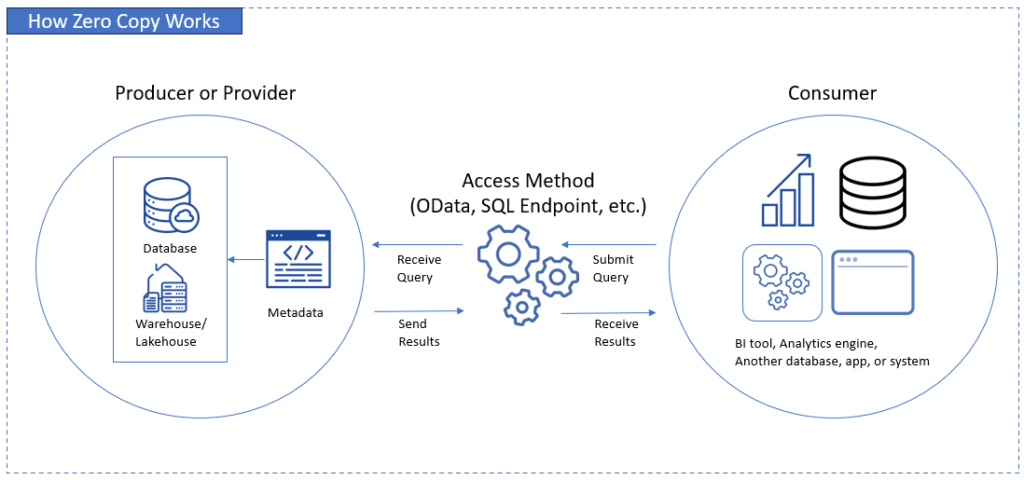
The data owner will establish what to share (tables, views, etc.) in the producer part. Any access method used will see the metadata and make a bridge between the producer and the consumer. Consumers will send queries and receive results using the preferred access method.
Let’s have an example.
Snowflake Zero Copy to Another Snowflake
This will allow read-only access to shared objects from one Snowflake account to another within the same region. The shared objects appear in another account’s Snowflake database. No data is copied, just pointers to the shared objects. They can query these shared objects in the same way as they do in their own local tables.
- Producer: A Snowflake data warehouse shared through Secure Data Sharing.
- Access Method: Snowflake Direct Share.
- Consumer: Another Snowflake account
The Key Benefits of a Zero Copy Architecture
Avoiding duplicate copies of your data has their good side. Consider the following benefits.
Creates a Single Source of Truth
This means you only have the one and only version – no sales_temp, sales_final, sales_latest, or something similar. Every consumer reads on the same tables and rows through a shared pointer.
This also means that there are no mismatched numbers. No more “why do the sales totals in finance differ from marketing?” Because every team reads the only source of truth.
Reduces Costs and Complexity
There’s a hidden cost every time you make a copy: more storage, more jobs to monitor, more late-night fixes. With zero copy, you drop the costs because you’re not making duplicates over and over again.
How about jobs and pipelines? Less moving parts, less headaches. Life is a bit easier.
Enhances Data Security and Governance
Which is easier – securing the original or securing the original + 5 more copies? It’s obvious, isn’t it? Zero copy shrinks the attack surface by keeping data in one secured home instead of scattering it across multiple environments.
Governance becomes simpler, cleaner, and actually enforceable. You secure one door instead of a whole apartment complex.
Improves Data Freshness and Enables Real-Time Insights
Batch pipelines may lag for hours, days, or more. It’s ETL, then refresh the dashboard. If it can be simplified into a query, why not zero copy?
With that, data stays fresh up to the last second. It’s always the latest. The difference is like watching a live game right now versus reading about it in the news hours later.
Zero Copy in Action: Use Cases for Your Business
See where zero copy applies in day-to-day business scenarios below.
Customer 360 Initiatives
Have you felt like stitching a quilt from too many scraps when building a full customer picture? CRM records in one corner, billing data in another, website events somewhere else.
Traditionally, you extract those info, format it a bit, and store it somewhere to get the sense of it.
Zero copy reverses that. If there’s a consistent key to match from CRM, ERP, and other sources, you don’t need to drag every dataset into a central hub. You simply peek into each system through shared, governed access — Salesforce, your data warehouse, your support tools, all read in place.
The result? A clean, unified, and latest customer 360 view without pipelines to build and jobs to monitor.
Note again that if data is clean with matching IDs to relate various customer sources, using zero copy is a good option for customer 360 initiatives. API limits from sources like Salesforce are also a deciding factor. Otherwise, an ETL pipeline that will clean, resolve, match records, and work within API limits still wins.
BI and Analytics
Zero copy lets analytic tools query data where it already lives, whether that’s a warehouse, a lakehouse, or operational read replicas or governed operational layers. They work with live tables, not copies from last night or last hour.
This means:
- metrics stay accurate
- reports refresh instantly
- decisions are based on now, not yesterday
It’s like trading a printed map for live GPS — you always know what’s really happening.
Data Sharing with Partners
Sharing data with vendors or partners usually means exporting CSVs, uploading them somewhere, or building a whole mini-ETL just for them.
Every time you export, you create a new footprint — another copy to secure and worry about.
Zero copy trims that risk. You expose only the slice of data they should see — no more, no less — through a secure, read-only share or endpoint.
They query the data where it lives. You keep control. No messy exports, no shadow copies floating around, and no opportunity for the wrong columns to slip through.
The Future is Zero Copy: How Skyvia Fits In
Skyvia is a universal data platform that allows you to connect to a broad range of data sources, whether it’s databases, SaaS apps, or warehouses. It excels not only in ETL, replication, backup, import/export, automation, but also in zero copy. It’s a flexible data management solution.
How?
Skyvia lets you connect and query in place without duplicating tables using Skyvia Query. Skyvia can also act as a bridge to your data and your tools through Skyvia Connect. This allows you to make OData and SQL Endpoints out of your existing Skyvia connections. Then, queries run against the source database.
Let’s have a Skyvia zero copy example.
“We’re thrilled to be recognized as Top Data Integration and Data Pipeline Tool by TrustRadius and our customers. Our mission is to make data integration accessible to businesses of all sizes and to all clients, regardless of their coding expertise. Receiving this award confirms that we are moving in the right direction by creating an easy-to-use yet feature-rich solution capable of handling complex scenarios.” Oleksandr Khirnyi, Chief Product Officer at Skyvia, stated.
PostgreSQL Database Zero Copy to a BI Tool through Skyvia OData Endpoint
This allows any PostgreSQL database to be queryable in a BI tool like Power BI. Skyvia’s OData Endpoint may use a connection to an on-premises or cloud PostgreSQL database and make a bridge to the BI tool.
- Producer: PostgreSQL database
- Access Method: Skyvia OData Endpoint
- Consumer: BI tool
Take a look at the OData Endpoint sample below:
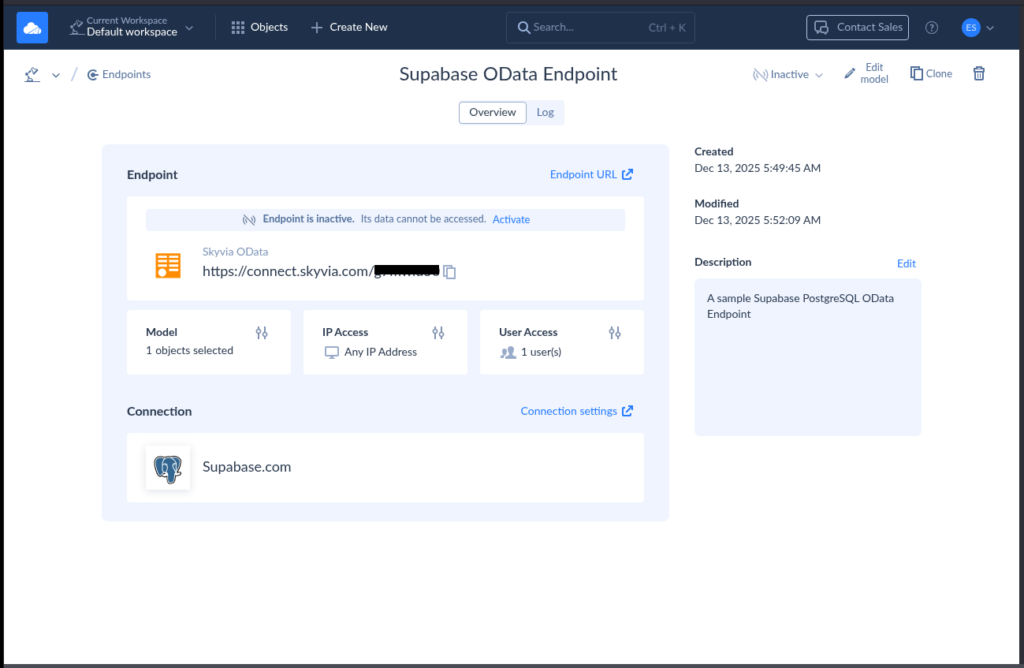
The above exposes 1 table from the PostgreSQL database in Supabase with one user account allowed to access it.
While zero copy is promising and minimizes copying, dumping, and staging, ETL/ELT are still necessary in many cases. Complex data sources need cleaning, shaping, or matching to make connections to each other. Moreover, zero copy doesn’t solve the latency problem to make data closer to user locations, so data replication is done, and a zero copy to a node may be necessary to achieve a faster result.
Conclusion
Zero copy is a smarter way to read data where it already lives. Just one governed source, read on demand.
The payoff is practical. Fewer copies mean lower storage costs. Fewer pipelines mean less breakage and less maintenance. Centralized data means stronger security and cleaner governance. Live access means fresher insights, not yesterday’s news.
Zero copy helps you stop the duplication habit. You keep control. Others read only what you allow.
If you want to see how this works in the real world — especially across cloud apps and on-prem systems — Skyvia provides the access layers, security, and governance to make zero-copy architectures practical.

F.A.Q. for What Is Zero Copy

What is the difference between zero copy and traditional ETL?
ETL copies, reshapes, and stores data elsewhere. Zero copy skips storage duplication and reads data directly from the source.
Is “zero copy” the same as “Zero ETL”?
No. Zero ETL reduces pipelines. Zero copy avoids creating new copies of datasets. You can use one without the other.
What are the main business benefits of a zero copy architecture?
Lower storage costs, fewer pipelines to maintain, better governance, and fresher data since users read the latest version.
Which platforms enable a zero copy approach?
Snowflake, BigQuery, Salesforce Data Cloud, data lakes with Apache Iceberg, and tools like Skyvia that expose governed access layers.
Does zero copy mean I don’t need data integration tools?
No. You still need tools for access control, metadata, security, and transformations. Zero copy reduces copying, not integration work.