Imagine a support team juggling customer questions in Zendesk while finance and operations keep everything running in NetSuite. Both teams are giving it their all, but the moment those systems stop talking to each other, the cracks start to show. Tickets mount up, agents begin the update chase across teams, and customers wait for answers that should be at their fingertips. Meanwhile, someone retypes the exact details into two different tools, which slows everyone down and leaves more room for mistakes to slip in.
It’s a familiar scene for growing companies: as ticket queues swell and customer expectations rise, the disconnect between Zendesk and NetSuite is starting to hold teams back. Without shared data, leaders struggle to get a complete picture of each customer, and day-to-day decisions get caught in a maze of manual work.
When Zendesk and NetSuite finally sync up, the whole workflow feels different. Instead of digging through systems or guessing what’s going on behind the scenes, teams see accurate updates right when they need them. Agents check order details without jumping around, finance gets cleaner records, and operations stay on top of customer activity without extra effort. The whole customer lifecycle becomes easier to understand and much simpler to act on.
In this tutorial, we will cover how to practically integrate Zendesk and NetSuite, and guide you through choosing which option best fits your business. To put this into context, let’s first get an overview of what these two platforms bring to the table, and why together they provide such a strong base for customer operations.
Table of Contents
- What are Zendesk and NetSuite?
- Why Integrate Zendesk and NetSuite?
- How to Integrate Zendesk and NetSuite
- Method 1: Native Connectors
- Method 2: Third-Party Integration Platforms
- Method 3: Custom API Development
- How Skyvia Handles Real-Life Zendesk to NetSuite Integration Cases
- Choosing the Right Integration Tool: What to Look For
- Conclusion
What are Zendesk and NetSuite?
Zendesk
Zendesk is designed to help support teams keep every customer conversation in one place, be that from email, chat, phone calls, or social messages. It all lands within a single workspace so that agents can stay on top of requests without having to jump between tools. It packs in ticketing, live chat, call center tools, AI-assisted replies, and reporting that helps teams spot patterns before they turn into bigger issues.
It took the day-to-day noise of customer communication and gave teams a clean way to process it: keeping conversations organized, helping agents easily pick up where others left off, and making it easier for businesses to stay responsive as they grow.
NetSuite
NetSuite sits on the other side of the business, powering the operations that keep everything moving. It’s a cloud ERP platform that brings finance, inventory, CRM, supply chain, HR, and e-commerce data under one roof. Companies use it as their central source of truth for orders, revenue, customer accounts, and internal workflows.
NetSuite helps teams automate recurring processes, track performance in real time, and shape data into insights leaders can act on. While Zendesk handles the frontline conversations, NetSuite takes care of the engines from order-to-cash cycles to inventory planning and financial reporting.
The Power of Two
Once the two systems connect, the whole experience shifts. Support agents can pull up order data directly inside Zendesk, finance gets accurate updates from support, and leaders gain a more honest view of what customers need.
Bringing Zendesk and NetSuite together turns them into a single, more reliable engine that helps teams move faster, avoid mistakes, and make clearer decisions.
Why Integrate Zendesk and NetSuite?
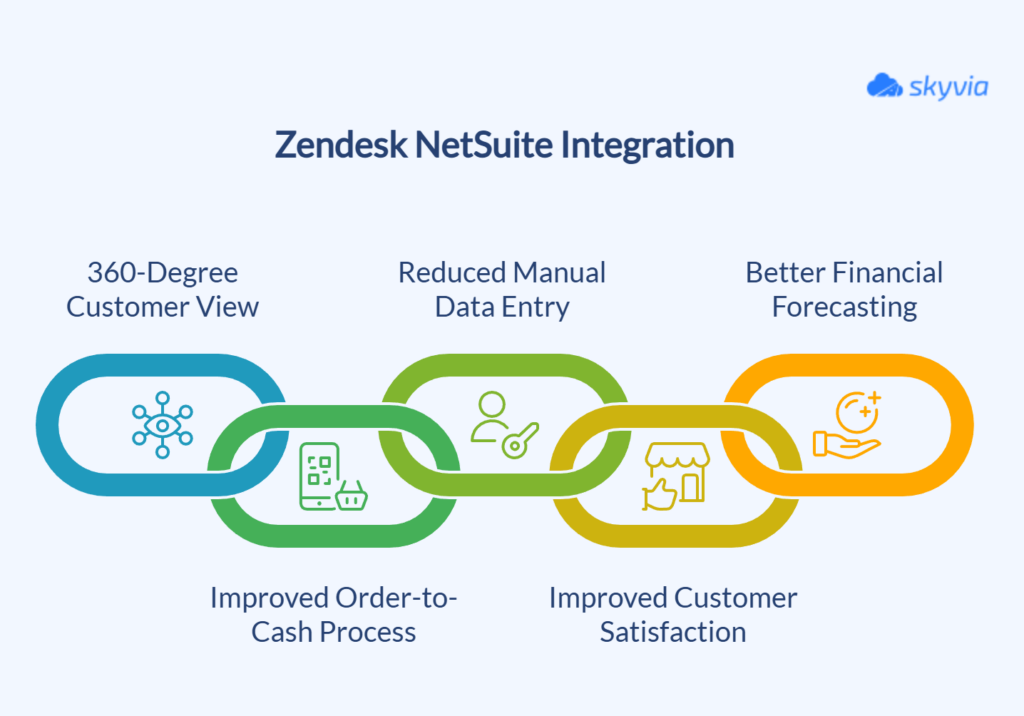
Zendesk and NetSuite integration gives teams a full picture of their customers and cuts out the routine work that slows operations down.
Instead of bouncing between two disconnected systems, data moves freely in both directions, helping teams make smarter decisions and react faster when customers reach out. Below are the core benefits companies see once the integration is in place.
360-Degree Customer View
When Zendesk pulls in NetSuite data, support agents get the kind of context that usually takes several clicks and a few internal messages. They can check order history, invoices, payments, fulfillment updates, and account details without leaving the ticket.
It’s especially valuable for e-commerce and subscription-driven businesses where a single issue often ties into multiple systems behind the scenes.
Improved Order-to-Cash Process
Support teams often hear about customer needs long before those details reach operations or finance. With Zendesk and NetSuite connected, new information gathered in a ticket can update customer records in NetSuite, trigger a sales order, or feed directly into case management.
Workflows like creating sales orders from approved requests or syncing Zendesk notes into NetSuite cases become far easier. It pulls support, sales, and finance into the same rhythm and keeps everyone working with the same information.
Reduced Manual Data Entry and Errors
When teams update each system separately, mismatched data and lost updates are almost inevitable. Integration clears that bottleneck by automating the small tasks that once ate up entire afternoons.
Companies usually notice:
- Fewer mismatched records
- Fewer missed updates
- Clearer reporting
- Less back-and-forth between departments
This goes beyond saving time. Clean data keeps financial reports accurate, reduces customer disputes, and prevents downstream issues that otherwise take hours to untangle.
Improved Customer Satisfaction
With order numbers, billing details, or shipment status already available in Zendesk, conversations move quickly, and customers get answers on the first reply. This leads to shorter resolution times, fewer escalations, and a smoother overall experience.
Many companies also find that agents become more proactive, spotting billing issues early, notifying customers of delays before they call in, and building trust through consistent communication.
Better Financial Forecasting
When Zendesk activity flows into NetSuite, finance teams finally see the operational signals that often get overlooked. Questions about renewals, rising return requests, or early signs of churn show up long before they hit financial reports.
This helps teams refine forecasts, plan inventory more confidently, reconcile billing with better accuracy, and adjust workload planning for support and operations.
How to Integrate Zendesk and NetSuite
There isn’t one single way to connect Zendesk and NetSuite. Some teams want something quick they can switch on in an afternoon. Others need deeper control, custom workflows, or long-term scalability. The three main paths:
Each offers a different balance of convenience and flexibility. The key is choosing the method that matches your team’s skills and the complexity of your processes.
Method 1: Native Connectors
Native connectors are prebuilt integration apps available in the Zendesk Marketplace or NetSuite’s SuiteApp catalog. They’re designed to get you up and running fast with minimal effort.
Best for
- Teams looking for a quick setup
- Standard workflows without heavy customization
- Businesses that prefer vendor-built, vendor-supported solutions
- Small or mid-sized companies where speed matters more than deep control
Step-by-Step Guide
- Ensure admin access to both Zendesk and NetSuite. Enable Zendesk API token access and NetSuite role permissions for integration.
- Search for the desired app in Zendesk Marketplace or in SuiteApp and install the bundle.
- Authenticate connection.
- Configure the integration. Use the app’s UI to build flows and set up field mapping, e.g., sync NetSuite Companies to Zendesk Organizations (map Company Name to Organization Name, include custom fields like Credit Limit).
- Set sync direction, frequency, and adjust other available settings.
- Test and run the integration
Limitations
- You’re limited to the logic the connector supports
- The method may not cover complex routing, custom records, or multi-entity NetSuite setups
- Field mapping options differ by vendor
- Overall flexibility depends on the preset workflows
Native connectors work best when your process fits their built-in design. When you need something more adaptable, the next method usually stands out.
Method 2: Third-Party Integration Platforms
Third-party integration platforms give teams far more flexibility without forcing them into custom coding. Tools like Skyvia, Celigo Integrator.io, Zapier, and others let you build data flows visually, adjust mappings as needs evolve, and automate a wide range of tasks.
Below, we demonstrate one of the use cases that can be implemented using Skyvia, a no-code cloud platform that helps users connect various data sources and solve different data-related tasks. With Skyvia, you can set up and manage integrations, construct complex data flows, build automations, use the prebuilt integration and automation templates, and much more.
Best for
- Teams that want no-code or low-code control over workflows
- Companies that expect their data flows to change over time
- Teams managing several integrations at once or implementing complex integration scenarios
- Businesses looking for a balance between flexibility, cost, and ease of use
Step-by-Step Guide
In this guide, we show how to create a NetSuite contact from a Zendesk user with a pre-built integration.
Prerequisites: You need an active Skyvia account to build integrations. Not registered yet? Get Skyvia and start implementing any integration scenario right away.

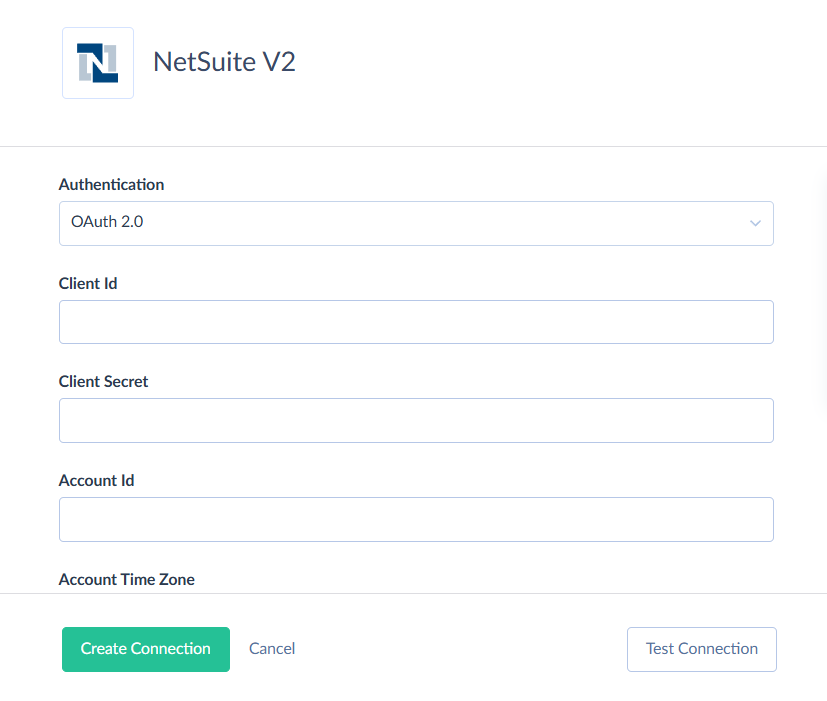
STEP 1. Create Connections to Zendesk and Salesforce.
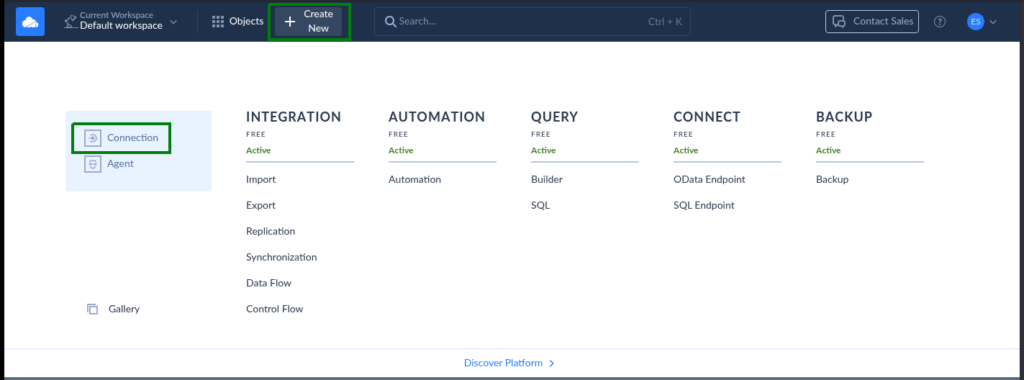
- Click +Create New -> Connection.
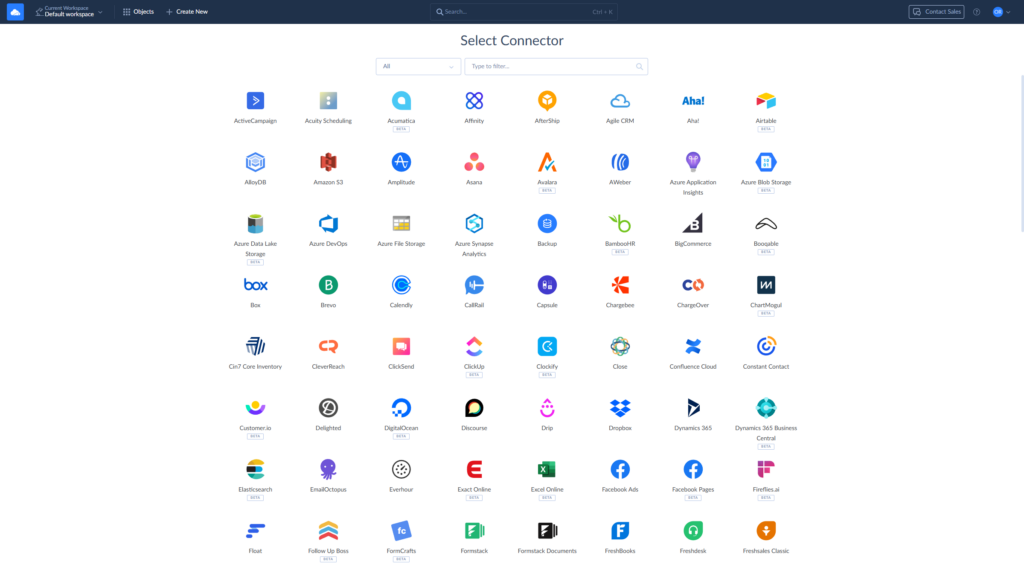
- Select the desired connector from the list.
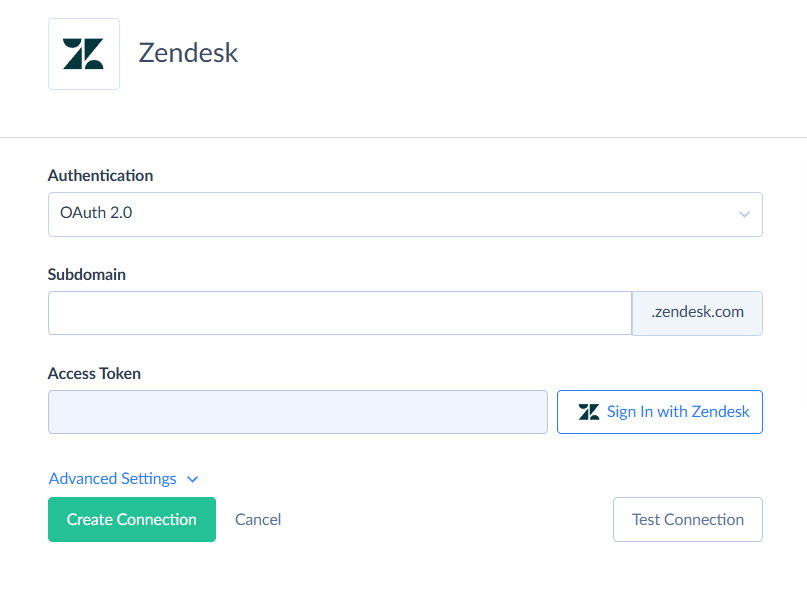
- Repeat steps 1-2 to connect to NetSuite.
STEP 2. Set up Integration
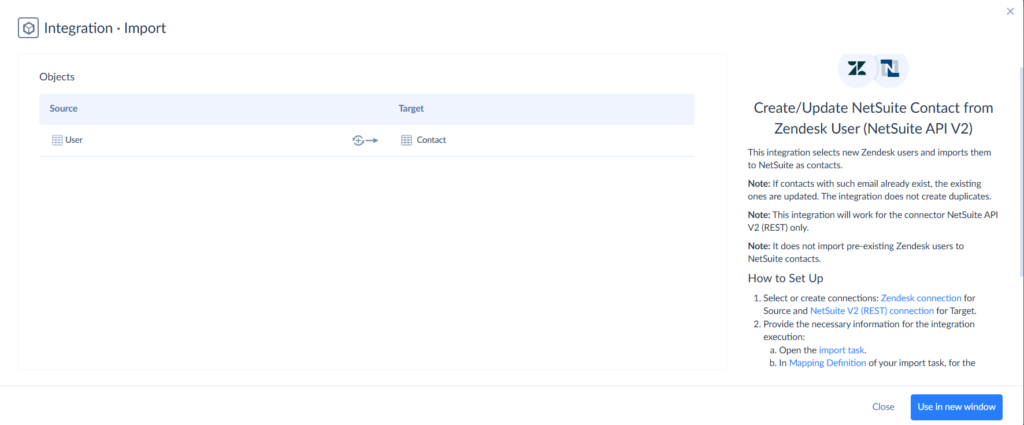
- Click +Create New -> Gallery and search for the desired integration.

- Read the import description and click Use in new window.
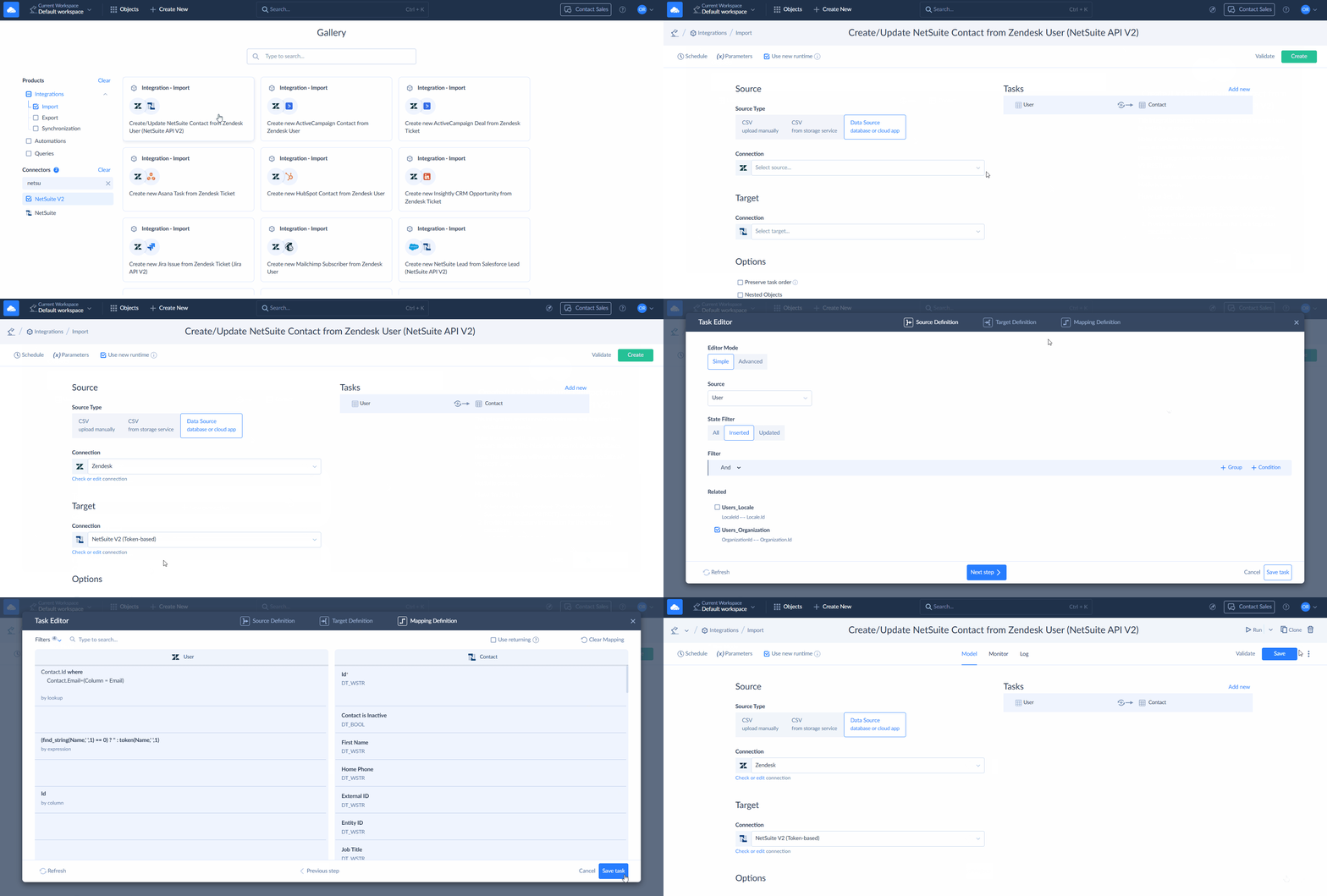
- In the next window, select Zendesk connection as source and NetSuite connection as target. Skyvia takes care of the rest. All you have to do is save the integration and run it. You can do this manually or using a schedule.
This was a simple prebuilt case. You can implement almost any scenario using Skyvia opportunities. Register now, and try Skyvia’s full potential to solve your data-related tasks.

Limitations
- Initial setup requires some planning around your data model
- Real-time synchronization or high-volume jobs may cost more on certain platforms
For most companies, this is the sweet spot, offering enough power to handle real-life complexity without the long-term burden of custom engineering.
Method 3: Custom API Development
Custom integration gives you full control. Using the Zendesk API, NetSuite REST/SOAP APIs, and SuiteScript, engineering teams can build exactly what the business needs.
Best for
- Organizations with in-house engineering resources
- Unique or highly specialized workflows
- Enterprise teams with strict security or data governance needs
- Businesses that require functionality that no tool currently supports
Limitations
- The highest initial and ongoing cost
- Maintenance falls entirely on your team (API changes, authentication updates, error handling)
- Requires deep knowledge of NetSuite’s SuiteScript and API structure
- Longer build and testing timelines
- Error monitoring, retry logic, and logging need to be built manually
Custom API development brings unmatched flexibility, but it only pays off when your requirements go far beyond what no-code or low-code tools can deliver.
How Skyvia Handles Real-Life Zendesk to NetSuite Integration Cases
Skyvia gives teams a no-code way to move data between Zendesk and NetSuite without getting tangled in scripting or long build cycles.
Its bidirectional sync, transformations, lookup logic, and upsert features help teams cut down on manual work and keep data aligned, even as processes evolve. Below are real-life scenarios where Skyvia steps in and clears the bottlenecks that usually slow teams down.
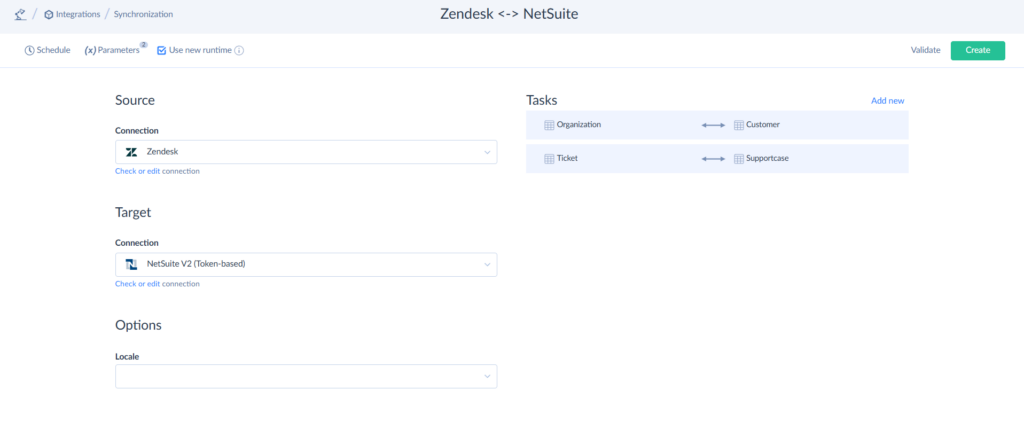
Bi-directional Sync Between Zendesk and NetSuite
When teams rely on both Zendesk and NetSuite day to day, keeping records aligned becomes mission-critical.
Support agents update customer details while solving tickets, finance adjusts billing data on their side, and sales pushes new opportunities or contract changes into the ERP. If these updates land out of sync, teams end up working from two different truths.
Skyvia steps into this problem with a bi-directional sync engine built to keep everything moving on the same page. It watches changes unfold independently in Zendesk and NetSuite, lines up fields on both sides, and applies intelligent conflict-handling rules.
What you get is a customer profile that moves with your workflow instead of fighting against it. Updates from finance show up instantly for support. Adjustments from agents flow straight into NetSuite. No scripts to maintain. No one-off fixes. No fragile middleware holding everything together. Just a shared, living dataset that everyone can trust.
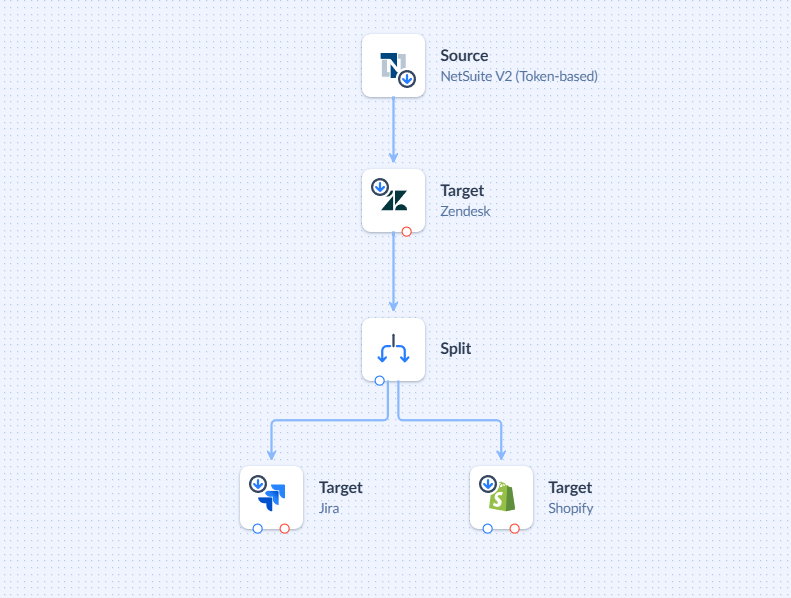
Multi-Connector Workflows: Zendesk, NetSuite, and Beyond
Most companies soon realize that syncing two systems is just the beginning. Support handles tickets in Zendesk. Finance lives in NetSuite. Sales might keep everything in Salesforce or HubSpot.
Fulfillment runs through Shopify or a warehouse system. Engineering keeps track of incidents in Jira. A single customer request often touches all of them before it’s done.
Skyvia’s multi-connector pipelines let you tie these scattered steps into one coordinated data flow. You can pull a Zendesk ticket, enrich it with NetSuite customer and order data, and then hand off an escalation to Jira and Shopify within a single low-code pipeline. Skyvia quietly manages the sequence, the dependencies, the lookups, and the transformations.
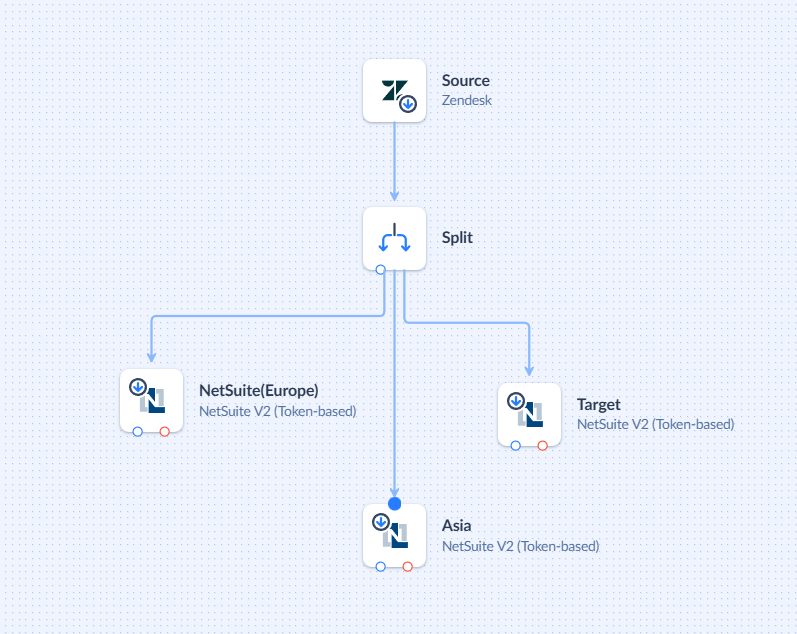
Multi-Entity NetSuite Setups
For companies running multiple subsidiaries or business units inside NetSuite, integrating Zendesk often requires more than simply syncing tickets to a single entity.
Each region, brand, or business line may use its own NetSuite subsidiary, each with unique accounting rules, customer segments, or item structures.
Skyvia allows you to route Zendesk updates intelligently across these entities using dynamic rules. You can direct data based on geography, product line, customer tier, or any other field available in Zendesk or NetSuite.
A ticket submitted by a European customer can update the EU subsidiary, while US-based escalations sync to the domestic entity within the same pipeline.
This structured approach removes the need for ad-hoc branching logic or custom-coded routing. Instead, multi-subsidiary NetSuite environments get a unified, predictable way to keep Zendesk data in the right place, maintaining compliance and reducing manual intervention across distributed teams.
Data Enrichment for Analytics and Reporting
Zendesk and NetSuite both generate high-value operational data, but the real insights emerge only when those data streams converge. Support metrics like backlog trends, CSAT, SLA performance, and ticket categories make more sense when viewed alongside revenue, subscription renewals, product margins, or customer lifetime value.
Skyvia helps teams bring these worlds together by piping Zendesk and NetSuite data into centralized analytics platforms like Snowflake, BigQuery, Redshift, or SQL.
The platform takes care of incremental extraction, schema mapping, and loading so analysts can focus on building dashboards rather than maintaining ingestion scripts.
Once combined, teams can build revenue-at-risk reports, SLA-based churn predictors, or “support cost per customer” dashboards that previously required painful exports or one-off ETL jobs. Skyvia essentially gives organizations a clean and automated path to multi-system analytics.

Choosing the Right Integration Tool: What to Look For
Not every Zendesk NetSuite integration tool solves the same problems. Some are built for speed, others for flexibility, and a few give you full control if you’re willing to invest the time.
The right choice depends on your data volume, internal skills, and how much freedom you want when shaping your workflows. Below are the qualities companies tend to weigh before committing to a solution.
Real-Time Sync and Automation
A good integration tool should keep Zendesk and NetSuite in lockstep. Updates to orders, invoices, or tickets shouldn’t sit in a queue waiting for someone to notice.
Look for tools that can:
- Push updates as soon as they happen
- Trigger workflows automatically
- Handle ticket-to-case or order-to-cash steps without manual input.
When data moves on its own, teams stop chasing context and start focusing on actual work.
Ease of Use and Flexibility
Most companies don’t want to rely on engineers for every adjustment, especially as processes change. No-code or low-code tools help teams tweak their workflows without starting from scratch.
Helpful features include:
- Drag-and-drop mapping
- Built-in connectors for both platforms
- Support for custom fields
- Filtering, transformations, and lookup logic
This gives operations, support, and IT the room to adjust as the business evolves.
Scalability and Performance
As ticket volume grows or order activity spikes, the integration needs to keep pace. A tool should scale without slowing down or overloading APIs.
A strong platform will:
- Manage heavy data loads without delays
- Offer incremental syncing to avoid unnecessary API calls
- Queue or batch records during the busy period
- Provide pricing tiers that grow with your needs
This prevents slowdowns when your customer base expands or seasonal spikes hit.
Security and Compliance
Zendesk and NetSuite carry sensitive customer and financial information, so security can’t be an afterthought.
A reliable integration tool should offer:
- secure authentication (OAuth or token-based access)
- encrypted data transfers
- role-based permissions
- audit logs for tracking changes
If you operate in a regulated industry, these controls become essential.
Monitoring and Support
Even the best integrations need oversight. A dependable tool should help you spot issues quickly and recover from errors without hours of troubleshooting.
Look for:
- clear dashboards with logs and job history
- detailed error messages
- retry options
- version control for flows and mappings
Good support and documentation go a long way, especially after API updates or system changes.
Conclusion
Connecting Zendesk and NetSuite brings your customer conversations and operational data into the same orbit. Support teams get the context they need without digging for it, finance works with cleaner and more reliable updates, and operations stop relying on manual steps that slow everything down.
Once both systems start sharing data, teams make quicker calls, customers get clearer answers, and the entire customer lifecycle becomes easier to manage.
If you want to put these advantages to work, Skyvia offers ready-to-use connectors for Zendesk and NetSuite that help you set up data flows without coding or long deployment cycles.
You can sync records, automate day-to-day tasks, and keep both systems aligned as your business grows. Try the free trial or request a demo if you’d like to see how Skyvia fits into your own workflows.
As more companies rely on connected systems to stay competitive, the ones that build strong data foundations now will be the ones ready to move faster and adapt when it matters most.

F.A.Q. for Zendesk NetSuite Integration

Does Zendesk have a built-in NetSuite integration?
Zendesk doesn’t include a native NetSuite connector. You’ll need a marketplace app or a third-party that provides ready-made pipelines and automated data syncing without custom code.
What data can sync between Zendesk and NetSuite?
You can sync organizations, contacts, tickets, support cases, orders, and invoices.
Why connect Zendesk and NetSuite?
Integration gives agents order and account data in Zendesk, cuts manual entry, and improves customer responses.
Can I sync custom fields and objects between the two systems?
Yes, third-party tools mostly support bidirectional custom field mapping & objects via APIs. Configure in Flow Builders for tailored syncs.