Summary
- SQL Server MCP is a bridge to let AI talk to SQL Server databases, and you can build one from scratch through coding or use a cloud-based MCP managed service such as Skyvia MCP Endpoint.
The trend is real, and it’s going upwards. Ninety percent of enterprises are actively adopting AI agents into their day-to-day operations. The more adoption it takes, the greater the need to access live data, not just AI’s training data. So, you may have heard – SQL Server MCP, among others like PostgreSQL, BigQuery, and file system MCPs, are the talk of the town.
It’s not that way before. Before modern agent frameworks and MCP, most AI tools relied mainly on static training data or custom-built integrations. It’s amazing as it is, but it’s not enough. AI is blind to your data in databases like SQL Server. So, in late 2024, Anthropic introduced the Model Context Protocol (MCP), an open standard for connecting AI models to external tools and data.
Let’s talk about using SQL Server MCP to close the gap between AI and your data in MS SQL. We’ll show you both the hard and easy way to do it.
Let’s begin.
Table of Contents
- What is the Model Context Protocol (MCP) for SQL Server?
- Why Connect AI to SQL Server? (Top Use Cases)
- The Hard Way: Building Your Own SQL Server MCP Server
- The Smart Way: Skyvia MCP Endpoints
- How to Connect Claude to SQL Server using Skyvia
- Security Best Practices for MCP Integration
- Conclusion
What is the Model Context Protocol (MCP) for SQL Server?
Model Context Protocol, or MCP, is an open standard that efficiently bridges Large Language Models (LLMs) to external data sources, tools, and APIs. The goal is to standardize communication so that each model and each data source will only implement MCP once.
Many MCP server implementations are built to expose relational databases such as SQL Server. So, SQL Server MCP is a standard way for AI to talk to MS SQL to answer user queries on their SQL Server data. Your job as a developer is to make the necessary tables available for the MCP server securely and efficiently.
A few components work together to make this happen. See the diagram below:
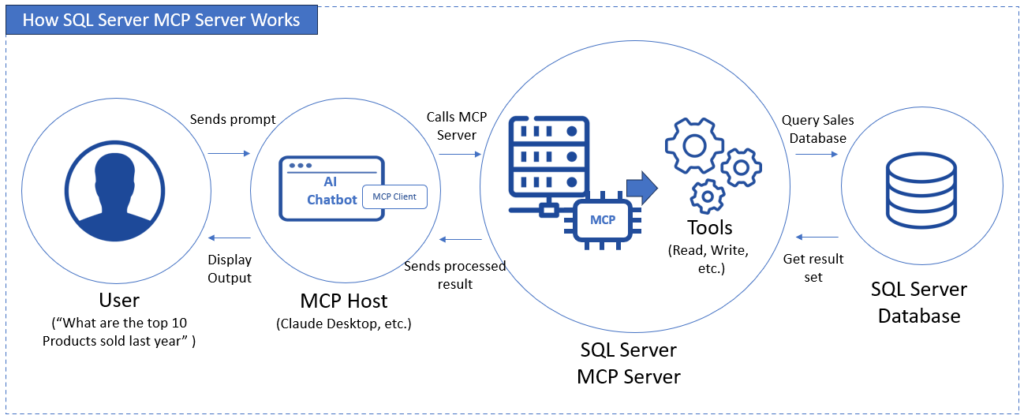
Some points from the diagram:
- MCP Host – The app where the LLM runs, like Claude Desktop.
- MCP Client – A communications bridge inside the MCP Host that acts as a translator between the LLM and the MCP Server.
- MCP Server – An external service that exposes and runs tools that will communicate with the SQL Server database and return data.
What makes SQL Server MCP so useful?
Why Connect AI to SQL Server? (Top Use Cases)
Microsoft gave us the SQL Server English Query, and I had a chance to try it in SQL Server 2000 back in the day. It was ahead of its time. The purpose is the same as SQL Server MCP today. The English Query was discontinued, but today we have a better option.
Check out why you need to connect AI to SQL Server.
Democratizing Data Access
The SQL Server engine only knows T-SQL. But users want to ask data questions using natural language. I’ve seen this again and again. Today, the Model Context Protocol for SQL Server changes the game.
So, instead of a T-SQL query like this:
SELECT TOP 10 month(period), product, sales_amount
FROM sales
WHERE period BETWEEN '06/01/2025' AND '12/31/2025'
ORDER BY month(period) DESC
You ask, “What are the top 10 products in sales for the period of June to December last year?”
It’s easy. It’s natural. And it’s something users will already know and understand.
Why it matters:
In my experience, users will ask for a report not present in our system through support and a DBA or someone technical will craft the query and paste the results in Excel. Finally, the Excel file reaches the user through email. MCP kills the back and forth and let users just ask AI about it. It becomes a self-service window. No more technical guy in the middle.
Automated Reporting
Do you remember SQL Server Reporting Services (SSRS).
We used to get the reporting requirements, fire up Visual Studio, design the report with the matching SQL query, deploy, and let the user run the report. But you can see the crystal-clear problem here: the development time stalls the benefit.
Why it matters:
With SQL Server MCP, the user asks, AI talks to the database through the MCP protocol, and gives the report to the user. Steps were cut, and the benefit is instant. AI can summarize the data coming from SQL Server and provide the output in Excel – no more waiting for some development process to complete.
Debugging & Schema Analysis
Honestly, this one need more secure guardrails and should be made for only the right people. I’m still comfortable using the AI assistant in dbForge Studio for SQL Server, but following SQL Server MCP best practices, this is possible.
This means you can ask questions about table structure, relationships, joins, and the like for your target SQL Server database.
Example:
→ “What does this table join to?” (name the table to be specific)
→ “Why does this query return duplicates?” (provide the query in question)
→ “Explain this stored procedure in plain English.” (name the stored procedure to be specific)
But this needs access to tables, stored procedures, and other SQL objects in the target database. So, check the best practices section later and proceed with caution.
Why this matters:
Without AI database tools like dbForge AI Assistant, you can ask questions for your SQL Server database using MCP instead of pasting database structure and queries to ChatGPT or Claude.
Query Optimization Assistance
Slow queries? You can ask AI “why?” and it will analyze query patterns and performance stats in sys.dm_exec_query_stats (provided you will give access to this SQL Server DMV). Again, this can be a red flag if not done correctly with best practices.
Why this matters:
If you don’t have tools like dbForge AI Assistant that do this job, you can ask query optimization questions to AI with MCP, provided that you give access to the right SQL Server objects.
Knowledge Capture for Legacy Systems
This one is a classic problem I experienced myself. You are new to a system with a SQL Server database. This was turned over to you because the guy who did this left the company.
I didn’t have AI back then to help me do this faster. But now, you can ask AI to document databases no one fully understands anymore with the help of SQL Server MCP.
Why this matters:
This is great for legacy systems given to you (and the previous tech guy assigned is no longer answering questions about it). Analyze with AI to understand the old system faster.

The Hard Way: Building Your Own SQL Server MCP Server
Before managed MCP services, connecting AI to SQL Server required building and hosting your own MCP server or custom integration code. With this, the MCP server won’t be available in minutes or hours.
You may want to know the process and challenges that come with building your own MCP server from scratch.
The Process of Building a SQL Server MCP From Scratch
Several steps include:
Development
- Find and clone an MCP server repository.
Pick a repository that already implements MCP and supports database connectors. Clone it locally using Git. - Review configuration files and environment variables
Check where the repo expects database credentials, ports, and auth settings. Most use .env files or YAML configs. - Install runtime and dependencies
Install Node.js or Python if you haven’t done so. Then run the package install commands. This pulls MCP libraries and database drivers. - Configure SQL Server connection settings
Add connection strings, SSL options, and credentials for SQL Server. This account should be read-only and limited to safe objects. - Define which tools or queries MCP will expose
Edit config or code to specify:
→ Which tables, views, or procedures are accessible. Use SQL Server impersonation when necessary.
→ What the AI is allowed to execute. - Implement authentication and access controls
Add API keys, tokens, or client verification so not anyone can call the MCP server.
Testing and Deployment
- Test locally with an MCP client
Run the server on localhost and connect using an MCP-enabled client like Claude Desktop. Validate schema discovery and query execution. - Containerize the MCP server (usually with Docker)
Create a Docker image so it can run consistently across machines and servers. - Configure firewall and network access
Open required ports and ensure secure connections between: AI client → MCP server → SQL Server. - Deploy to a server or cloud platform
Run the container on a VM, Kubernetes, or managed container service. - Set up monitoring and logging
Track uptime, request volume, query duration, and failures. - Maintain and update dependencies
Apply security patches, update MCP libraries, and rotate credentials regularly.
How about that? This can be the most flexible way to do it, but…
It’s not something like “install and go” or “plug and play”. Most of the work above doesn’t involve AI but lots of plumbing.
“Is there anything simpler than that?” you may ask, because there are challenges.
The Challenges of Building from Scratch
Building from scratch can be exciting. That’s how I feel about this. But know the roadblocks of this approach below.
1. Security Risks
What can go wrong:
The MCP server becomes a new attack surface.
Examples:
- Exposed API endpoint
- Weak auth token
- Over-privileged SQL login
Now an AI client — or worse, an attacker — can run broad queries on your SQL Server database. Even read-only can still leak sensitive info.
2. Ongoing Maintenance
What this means:
Uptime, patches, and upgrades – all on you.
Examples:
- MCP spec changes
- Node/Python dependency updates
- SQL drivers get security fixes
Miss any of these, and you’re running known vulnerabilities. This is not “set and forget.”
3. System Complexity
Why this is so challenging:
You’re adding another moving part to your stack.
Example
Now you must manage:
AI client → MCP server → network → SQL Server
When something breaks, you debug all three. It only gets harder, not easier.
4. Performance and Workload Impact
What can go wrong:
AI sends heavy or unpredictable queries.
Example:
AI explores data with wide table scans. The worst part? You connect AI to production. Then, the OLTP workload slows down. Finally, users complain before you even see the logs.
Without throttling and caching, MCP can hurt production systems.
5. Governance and Audit Gaps
Why this is a challenge:
You lack clear visibility into what AI is actually doing.
Example:
- No detailed query logs
- No per-user tracking
- No retention policies
Then, these questions are hard to answer:
→ Who accessed what?
→ When?
→ Why?
That’s a compliance problem in many companies.
The Smart Way: Skyvia MCP Endpoints
Is Node.js too alien for you? And when asked about Docker, connection strings, and SSL, you are like, “Uhm, what’s that again?” or your head hurts. You can stop worrying about them because there’s a managed MCP service that is native to the cloud – Skyvia MCP Endpoints.
With Skyvia MCP Endpoint, you can connect not just SQL Server but also other databases and cloud apps to AI agents. You don’t need JavaScript, Typescript, or Python skills. Just your connection to SQL Server or other data sources, and a few security configurations in an easy fill-in-the-blanks form.
Let’s describe them further below.
Key Differentiators
Some of the benefits you gain vs. building your own MCP server from scratch are the following:
No-Code Setup
You curate the tables or views in a read replica and let Skyvia connect to this SQL Server database. Set up user access or whitelist IP addresses in a graphical interface. No .js, .ts, or .py files to create.
Cloud-Native
Skyvia Connect and its MCP Endpoint are all in the cloud. So, if setting up virtual machines and deploying Docker containers there are not your thing, Skyvia made it simpler for you. It’s a managed service, so you don’t need to install, upgrade, or patch anything.
Server setup and maintenance is off your plate.
Universal Connectivity
Do you have other data sources you want AI to tap into? Skyvia connects to more than 200 data sources, including QuickBooks, Salesforce, and yes, SQL Server.
Security First
Skyvia uses enterprise-grade security across its platform. So expect encryption, IP whitelisting, and logging within its MCP Endpoint. Building from scratch needs coding these security features. Maintaining them is another matter.
With Skyvia, these security must-haves are built in.
With these differentiators clear, it’s only natural to ask, “How do you do it? What’s the process?”

How to Connect Claude to SQL Server using Skyvia
It’s time for showing, not just telling. This section will show you how to use Claude Desktop with the Skyvia MCP Endpoint.
STEP 1: Create a Skyvia Connection to Your SQL Server Database
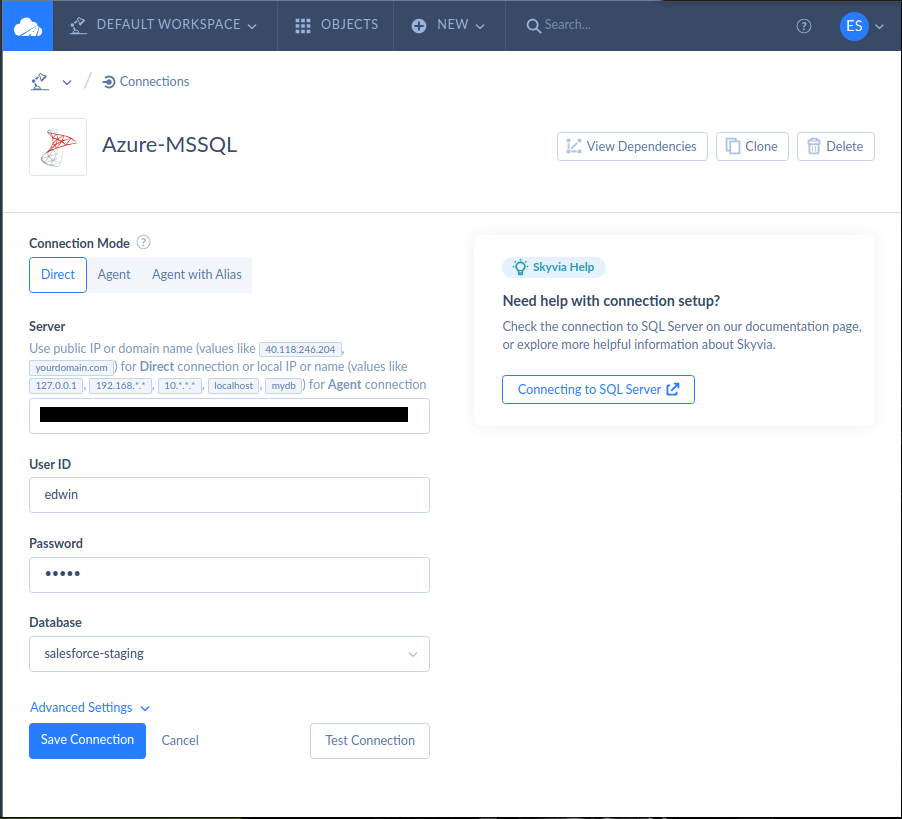
Creating a Skyvia connection for SQL Server is simple. First, click + Create New in the upper-left corner of the page. Then, choose Connection. Search for the connector you need. In this case, SQL Server. Click it, and configure the SQL Server connection.
Below is my connection to Azure SQL Server:
STEP 2: Create the Skyvia MCP Endpoint
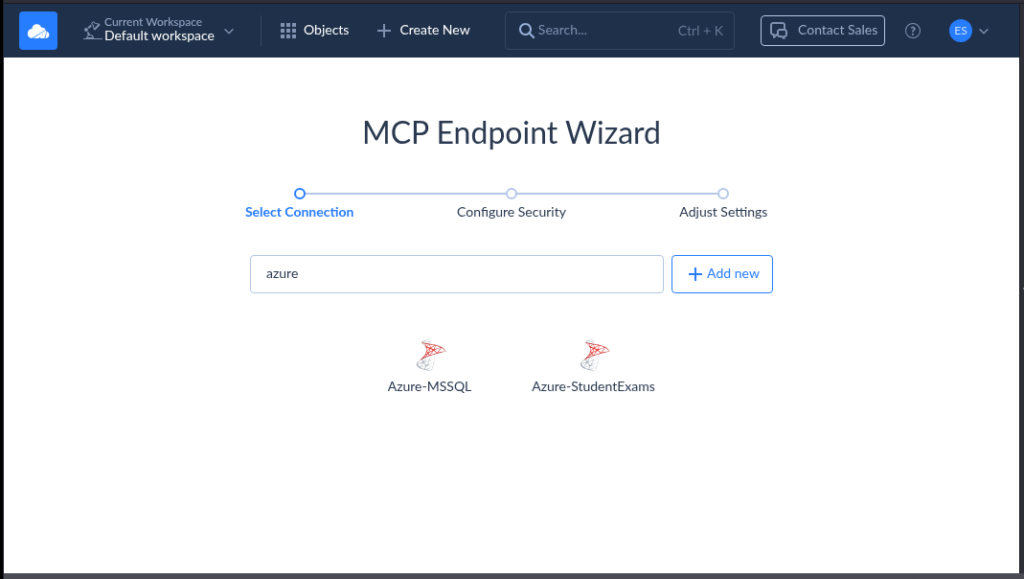
This one is also easy to do. Click + Create New, and select MCP Endpoint. Then, a setup wizard page will appear. Choose the SQL Server connection you used in STEP 1. Then, choose the tables or views.
Here’s a sample using the connection in STEP 1:
STEP 3: Configure Security
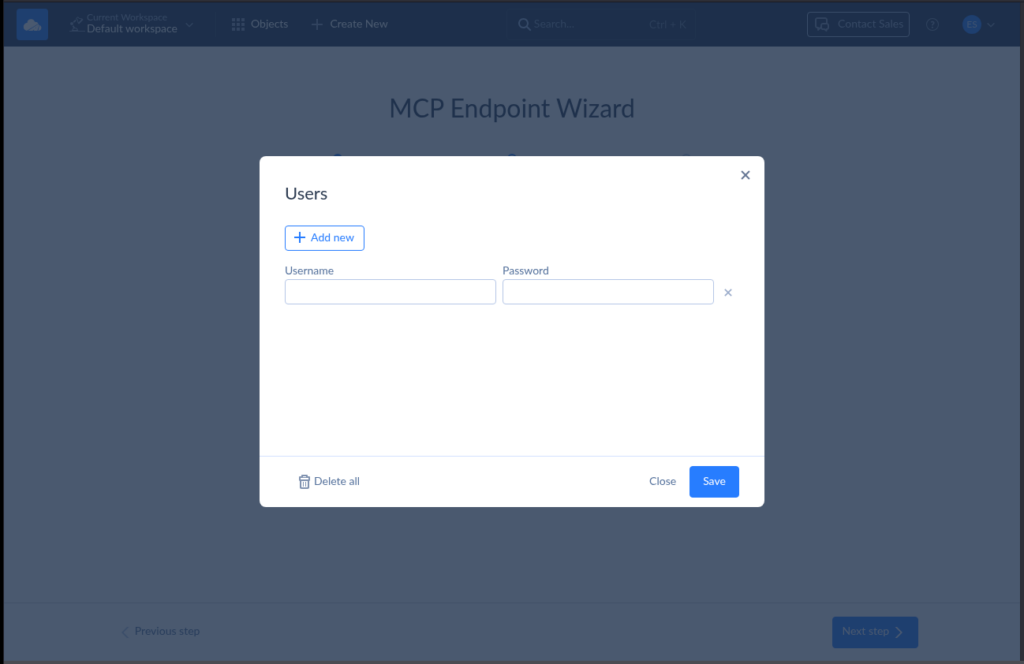
In this step, you can choose to add a user credential and whitelist IP addresses.
Below is a sample for adding a user:
And below is for whitelisting IP addresses:
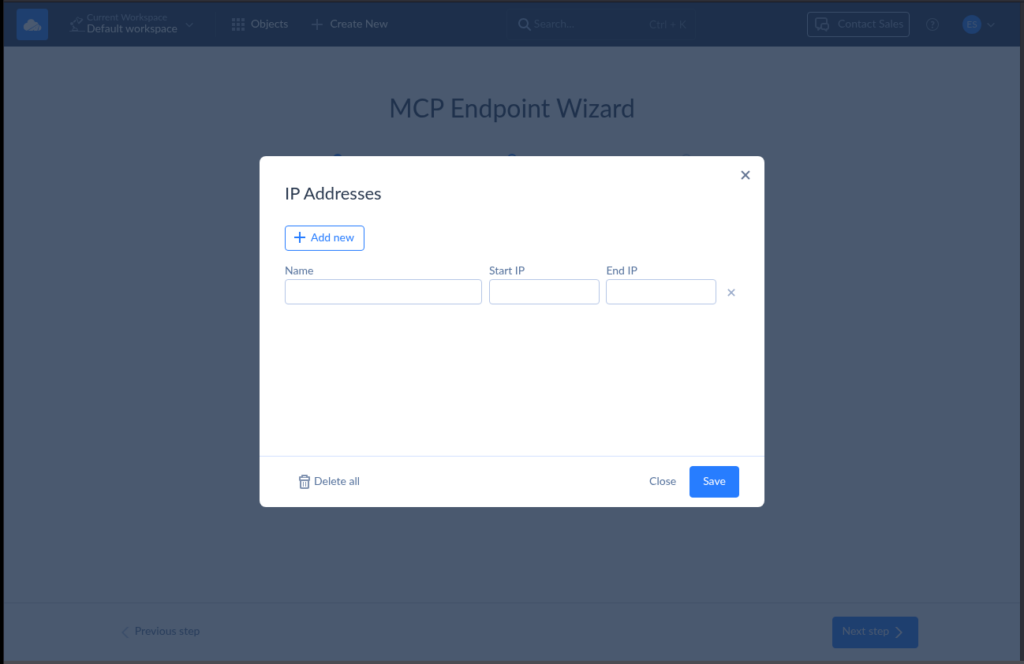
After doing this, you can click Next step, name your MCP Endpoint, and save it.
STEP 4: Connect to Claude Desktop
You will need to copy the Skyvia MCP Endpoint URL. See mine below:
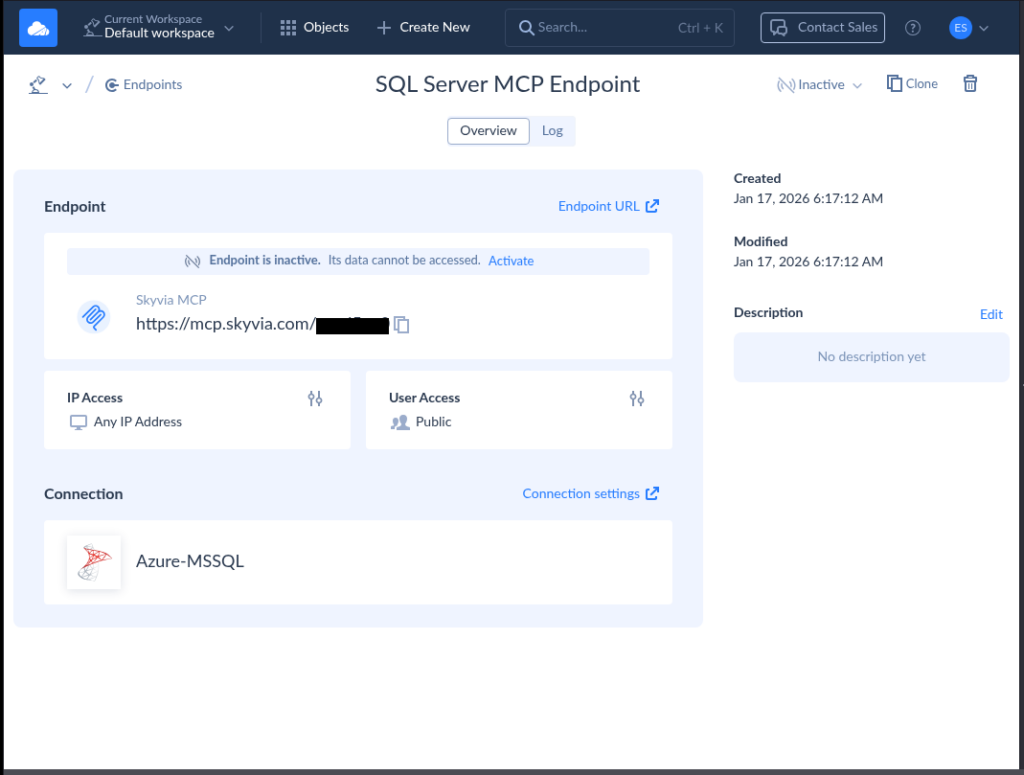
From here, you can paste the URL to the Claude Desktop configuration. The config should be similar to the one below:
{
  "mcpServers": {
    "dev-mcp-test": {
      "command": "npx",
      "args": [
        "mcp-remote",
        "https://mcp.skyvia.com/XXXXXXXX",
        "--allow-http",
        "--debug",
        "--header",
        "Authorization:${AUTH_HEADER}"
      ],
      "env": {
        "AUTH_HEADER": "Basic YYYYYYYYYYYYYYYYYY=="
      }
    }
  }
}
Replace the https://mcp.skyvia.com/XXXXXXXX with your MCP endpoint URL and YYYYYYYYYYYYYYYYYY with your authorization header.
For more details, please check the documentation here.
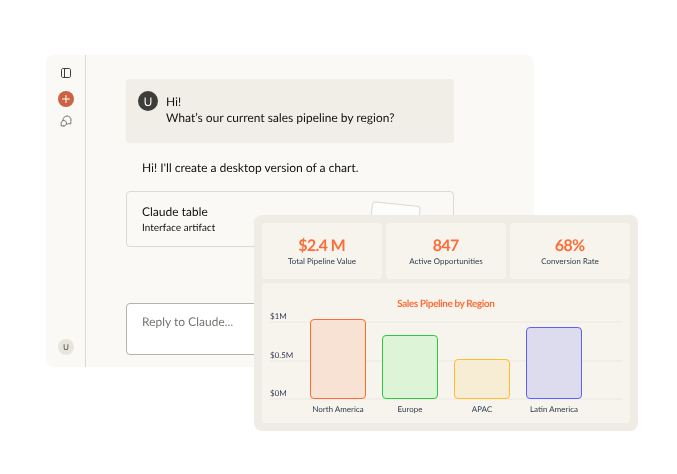
STEP 5: Start Chatting
Open your Claude Desktop and enter a prompt that will query the SQL Server database. It should be similar to the one below:
Security Best Practices for MCP Integration
Using MCP in SQL Server is a good thing, but security nightmares are just around the corner if you ignore security best practices.
Let’s dive in.
1. Use Read-Only Database Accounts
Never ever use sa or any user with dbo (database owner) privileges. Use an account with the least privilege with tables or views carefully picked. No write, just read.
Why this matters:
It avoids letting AI see what it should not and avoids inserting, updating, and deleting records. Moreover, if someone prompts “DROP TABLE sales_details”, it won’t work – damage avoided.
Examples:
✔️ “Give me the top 5 products sold last month.” – read-only query of specific data items.
✔️ “How many customers bought facial creams last week?” – another read-only query that will do a summation.
❌ “Can you change the selling price of facial moisturizers for men to $1?” – update of a row and column not allowed.
❌ “Can you drop the sales database and start fresh?” – a security breach that will delete the database.
Using SQL Server dbo is a loaded gun. Using sa is a weapon of mass destruction (at least for your entire database server). Read-only database accounts make you sleep better at night. Use the latter for AI.
2. Expose Views, Not Base Tables
You can grant SELECT permissions to the read-only account you used in #1. Much better if you use views only, not base tables.
Why this matters:
Queries are simpler with views. You can also hide personal information, but expose info with figures and stats only. Auditors love this.
Examples:
✔️ “Give me the top 3 stores in the last midnight sale.” – no to SELECT * FROM sales INNER JOIN to stores. Instead, use SELECT * FROM view – simpler.
❌ “Give me the top 10 clients who bought building insurance last week. Include their home address, phone number, and email.” – Oops. This is an audit red flag for the wrong people and use cases. Views hide personal information. Design the MCP tools to reject a prompt like this.
3. Use Stored Procedures as Safety Rails
Aside from views, you have the option to grant execute permissions to select stored procedures using the read-only account you made in #1. With this, you can wrap sensitive queries.
Why it matters:
AI can only run what you allow. With stored procedures, MCP can’t touch the tables. So, expect:
- No accidental SELECT * on big tables,
- No surprise joins on sensitive data,
- Schema exposure is limited, and
- No ad-hoc writes.
Example:
Procedure: usp_GetTopCustomers(@StartDate, @EndDate)
MCP account has only EXECUTE permission.
No direct table access needed.
4. Use EXECUTE AS for Privilege Control
SQL Server has something called impersonation. This lets stored procedures run with controlled internal permissions. You can use the EXECUTE AS clause and let the permission of a higher-level account use that instead of the read-only account – only until the query is done. Then, REVERT the permissions back after the query.
Why it matters:
It allows less-privileged accounts temporary access to tables until the query returns a result set. Caller stays low-privilege, but procedure can read needed tables.
Example:
CREATE PROCEDURE usp_GetTop10Stores(@StartDate, @EndDate)
WITH EXECUTE AS OWNER
The code under the EXECUTE AS clause will use the permissions of the OWNER, typically dbo. The read-only MCP login has no table rights. But the stored procedure still works.
5. Monitor and Log All AI Queries
Track what the MCP account executes.
Why this matters:
You need audit trails and performance visibility. If something goes wrong, you’re not blind.
Example:
Log query text and execution metrics using MCP logs, Query Store, or Extended Events.
If AI causes heavy table scans, you’ll see it fast. Duration reveals it and the query that caused it.
6. Isolate MCP from OLTP Workloads
AI queries coming from SQL Server MCP may cause lag. Avoid running AI queries on hot production systems. Replicate the tables you need to another location, and let the MCP server use that.
Why it matters:
LLM-driven exploration can be unpredictable.
Example:
Options you can choose from instead of production servers:
→ Read replica
→ Reporting database
→ Nightly replicated copy
That way, OLTP stays fast, AI plays elsewhere, and everyone is happy.
Conclusion
We discussed what SQL Server MCP is and its benefits to you. It’s clear why this protocol is trending and evolving as it provides a real benefit more than what SQL Server English Query did in the past. There’s a hard way to implement this with coding, but if you’re into fast implementation, you should go the easy way using Skyvia. Make sure to follow best practices and avoid security gotchas along the way.
If you’re ready to talk with your SQL Server database with AI, try Skyvia for free and finish it in minutes, not days or weeks. Create your free Skyvia account and set up your first MCP Endpoint today.

F.A.Q. for SQL Server MCP

Why use Skyvia for SQL Server MCP instead of a local Docker container?
Skyvia removes setup and maintenance work. No Docker, no custom code, no firewall tuning. It provides a managed, secure MCP endpoint with logging, access control, and faster time to value.
Is it safe to connect AI agents to my SQL Server database?
Yes, if done correctly. Safety depends on read-only access, limited schemas, stored procedures, and audit logs. Managed MCP endpoints add guardrails that reduce accidental or excessive access.
Can I use Skyvia MCP with on-premise SQL Server?
Yes. Skyvia supports on-premise SQL Server using a secure agent, allowing MCP access without exposing the database directly to the public internet.
Does the AI train on my SQL Server data?
No. AI clients access SQL Server data through MCP at query time only. The data is not stored, reused, or used to train AI models.
What AI clients currently support SQL Server MCP connections?
AI clients that support the Model Context Protocol, such as Claude Desktop and MCP-enabled developer tools, can connect to SQL Server MCP endpoints. Support is growing across AI platforms.