Summary
- A BigQuery MCP server unlocks conversational AI analytics; you can build a custom solution using Google's open-source tools or deploy a secure, no-code endpoint in minutes with a platform like Skyvia.
This topic of Google BigQuery MCP server made me nostalgic of what happened years ago when I’m just starting with IT project management. I quickly saw that users want to query our seafarer database using natural language. That was the year 2001. Then, after a while came the English Query – a feature in SQL Server 2000 with a promise to do just that – make English queries. It was too ahead of its time.
Fast-forward to 2025, I moved on from SQL Server to try other databases and data storage. BigQuery became a good candidate for data warehouses. But users still want something like “Give me the summary of Black Friday sales.” Now with AI and MCP, the dream is finally here. Instead of a SELECT statement, users simply “talk” to AI to get what they want out of their data.
But what is the BigQuery MCP server, and how can you make it work? Check out what I found out, including a no-code alternative.
Table of Contents
- What is the Model Context Protocol (MCP)?
- Why You Need a BigQuery MCP Server
- How to Set Up a BigQuery MCP Server: The Technical Approach
- The No-Code Alternative: Connecting BigQuery with Skyvia’s MCP Endpoint
- Practical Use Case: Answering Business Questions with AI and BigQuery
- The Future of Conversational Data Analysis
- Conclusion
What is the Model Context Protocol (MCP)?
Model Context Protocol, or MCP, is an open standard for bridging AI to external data, tools, and services. It allows AI models, like Claude, and Integrated Development Environments (IDEs), like Cursor, talk to external tools and data. It’s like a translator. It’s also an extension to AI’s internal intelligence, providing better context to avoid hallucination.
MCP servers, on the other hand, use the MCP standard to enable the flow between AI and your external data. The diagram below shows how it works in general:
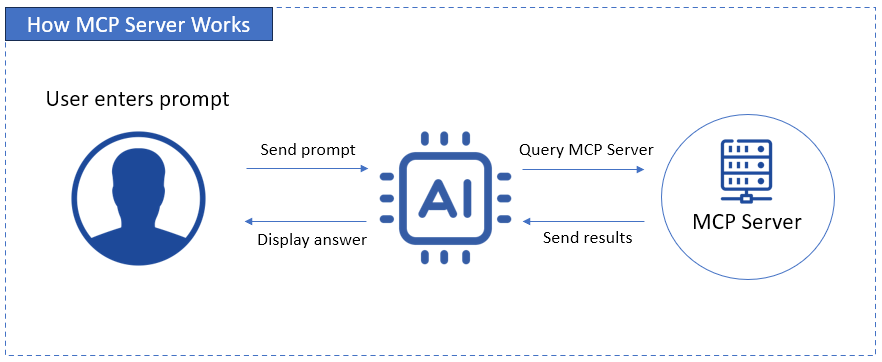
This makes the BigQuery MCP server bridge AI to your BigQuery cloud data warehouse.
So, instead of using SQL to “ask” BigQuery, natural language fits in your workflow to unearth the story behind your data – all done securely.
How can one tool make BigQuery easier, faster, safer, and cheaper for everyone?
Why You Need a BigQuery MCP Server
With BigQuery MCP servers, you can let your users ask AI without SQL – yes, not starting the prompt with SELECT – all done securely and reduces accidental cost bombshells. Here are the pluses I found when I learned about this.
Democratize Data Access
It’s alright to teach SQL to newbie developers. But users? They never had the schooling for the concepts behind it. So, I never attempted it. It’s simply going to be hard.
Back in the day, when users want querying facilities, we gave them all the columns they need and let them choose what they need at the moment. Then, they hit the Run button. When English Query came to SQL Server, it handled a narrow set of sentences. So, if “Show me the top 10 customers in London” may succeed, “Which top 10 customers are based in London?” may fail. Users should use a set of words and sentences only.
It’s burdensome for developers to set up, and if there are schema changes, they have to do it again.
But with LLMs today, differences in sentence structure and choice of words are handled for us – developers and users alike. Suddenly, the need to query BigQuery data doesn’t always need SQL anymore.
Accelerate Development
Again, back in the day, we set the columns needed by users for their querying needs. But when they need a new one, we have to code again to add that column. So, there’s a time gap before users get what they need. It will have to pass coding -> testing -> deployment. Then, if there are bugs, back to coding again.
Today, developers can build AI-powered apps that can intelligently query and analyze data – even produce charts and tables. That’s a time-saver if users want a different angle in data presentation.
So, let’s say the initial prompt is “Give me the top 10 customers in London and rank them.” Then, a follow-up like “Now, give me the most bought product of those 10 customers.” AI can handle the pronoun resolution (“those 10 customers”) and apply contextual chaining. As long as the bought products are available in the MCP features of the server, AI can deliver what the user wants.
Of course, realistically, if users ask for something not there, AI will block or deny those requests (if properly configured). This takes us to the next benefit.
Enhance Data Security
If users ask, “Give me the list of customers and their contact information,” what now?
That prompt, if allowed in the BigQuery MCP server, will expose sensitive information. If I’m the one to implement this project, I have two choices:
- Add all the guardrails to filter out results with sensitive information, or
- Create a safe copy of the BigQuery warehouse that doesn’t include sensitive info, and let MCP access it.
The easier approach for me is the second one. It also avoids any guardrails I may forget. Of course, it depends on your exact requirements. Make sure that your project team or committee will agree on what AI can access before adding this MCP bridge to your BigQuery warehouse.
If there will be layers of user access, this adds to the problem, but it’s doable. You can add user roles, maybe restrict by IP addresses, to avoid unauthorized access to the BigQuery MCP server.
Control Costs
Here’s the big deal: AI can run a $2000 query if not controlled, because BigQuery bills by data scanned. With a BigQuery MCP server, you can control that with specific actions AI can use.
Under the hood, SQL still runs the show in querying data. But the actions you define for the MCP server will help avoid a SELECT * FROM TABLE to return billions of rows – a costly mistake.
Now that you know the benefits of using MCP for BigQuery, how can you build one? You have two options.
How to Set Up a BigQuery MCP Server: The Technical Approach
Let’s start with the flexible option, where you build the bridge for AI and Google BigQuery, configure stuff, and self-host it.
General Steps
Ready your technical chops when dealing with self-hosted MCP servers. Here are the general steps:
- Pick a server. This can be a machine on premises or a cloud virtual machine – your choice.
- Choose an open source BigQuery MCP server. Your options include the MCP Toolbox for Databases from Google or a community OSS called mcp-bigquery-server. Most are built on Node.js or Python. Don’t worry, you won’t build from scratch. You will just piece things together, or maybe add features yourself.
- Then go to Google Cloud and create a GCP service account with roles like Data Viewer and Job User.
- Download the JSON key file. This is your digital access card.
- From your BigQuery setup, get the Project ID and Dataset name. Note the allowed tables in the dataset. But if you already filtered out any personal or sensitive info, then it means all tables. Check out a sample below from my own GCP account for identifying the Project and Dataset IDs.
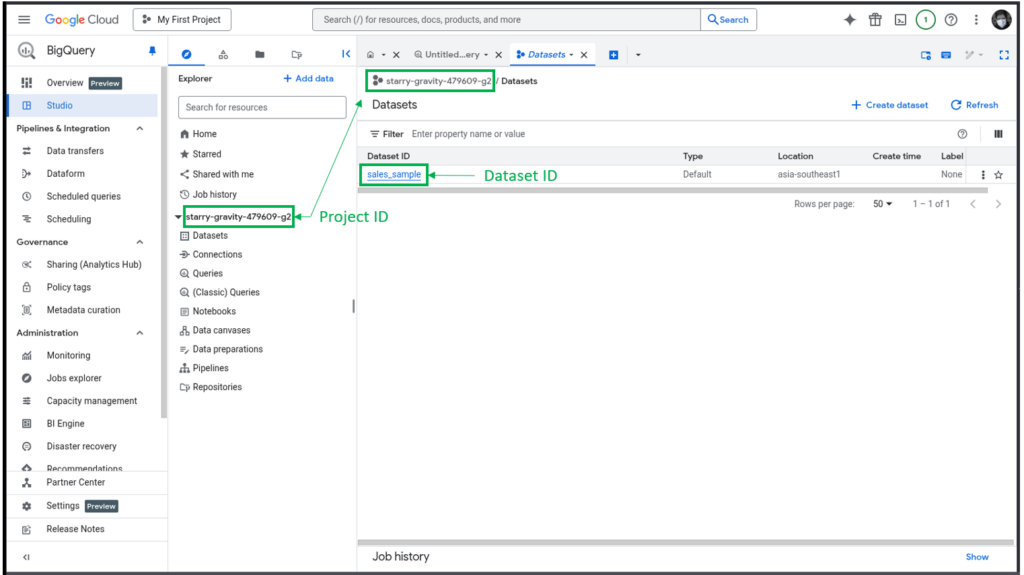
- Configure the MCP server with the Project ID, Dataset name, allowed tables, and query limits.
- Add guardrails. Block dangerous commands like DROP and ALTER. Or if you will use the MCP Server as read only, also block DELETE, UPDATE, INSERT, and MERGE commands.
- Test and run the MCP server. Running it will read the JSON key file.
For more detailed setups, check the documentation of your chosen open source MCP server. Once it’s running, you can configure your MCP client, like Claude Desktop, to use your new BigQuery MCP server.
Pros
If you choose this route, the following benefits await you:
- Full control – No black boxes. You decide who can access what, when, and how.
- Custom security rules – You can add your own filters, validation, and guardrails before a query ever hits BigQuery.
- Flexible deployment – You run it on a VM, Docker, Kubernetes, or on-prem. It fits what you already have instead of the other way around.
- Better governance – Log every request, track costs, and audit usage the way you want it — like putting cameras in every hallway.
- Scales with your needs – You can scale your server as usage grows.
Cons
You may think, “Full control is good. I want that!” But there are gotchas:
- More engineering time, more setup work – You’re handling credentials, IAM roles, network security, API limits, everything.
- You own the maintenance – You have a new baby. You monitor, patch it, and fix it if it breaks.
- Higher security risk if done wrong – Misconfigured service accounts or open endpoints = data leak potential. One wrong switch, and the door’s unlocked.
- Steeper learning curve – You have to be THE tech guy – GCP, BigQuery, networking, security best practices – it’s on you.
- Costs can sneak up – it can be like a shopping cart that keeps piling up items, if not controlled. This means bad queries or abuse that will fire up BigQuery costs.
That’s how it is for the technical approach. But what if there’s an easier approach? Something done in as little as a few minutes or so under ideal conditions?
The No-Code Alternative: Connecting BigQuery with Skyvia’s MCP Endpoint
A few minutes? That’s crazy.
But yet, here you are reading this section, because you also want an easier path. There’s nothing wrong with that. It won’t make you a lesser developer than everyone else.
Making your own self-hosted BigQuery MCP Server needs a lot of your time, energy, and effort. It’s undeniable. But there’s Skyvia – a cloud data platform that has an MCP Endpoint for any data connection it supports, including BigQuery, that is ready to use.
Key Benefits
What can you get out of a ready-to-use MCP Endpoint from Skyvia? Follow along as I list it down.
1. Zero Configuration
No server for you to set up and manage. No GitHub repositories to clone, nor other CLI commands to use. Skyvia manages that for you.
2. Broad Compatibility
It’s not just BigQuery. Use a vast ecosystem of other data sources using the same web graphical interface. Think of Snowflake, MySQL, SQL Server, even Salesforce, HubSpot, and more.
3. Visual, User-Friendly Interface
It’s point and click. No memorizing CLI commands, no checking of syntax from docs. Just a simple form that even newbies can understand. You only need two things:
- A Skyvia connection to your data source (In this case, BigQuery), and
- The Skyvia MCP Endpoint that will use that Skyvia connection.
Here’s what the Skyvia connection to BigQuery looks like:
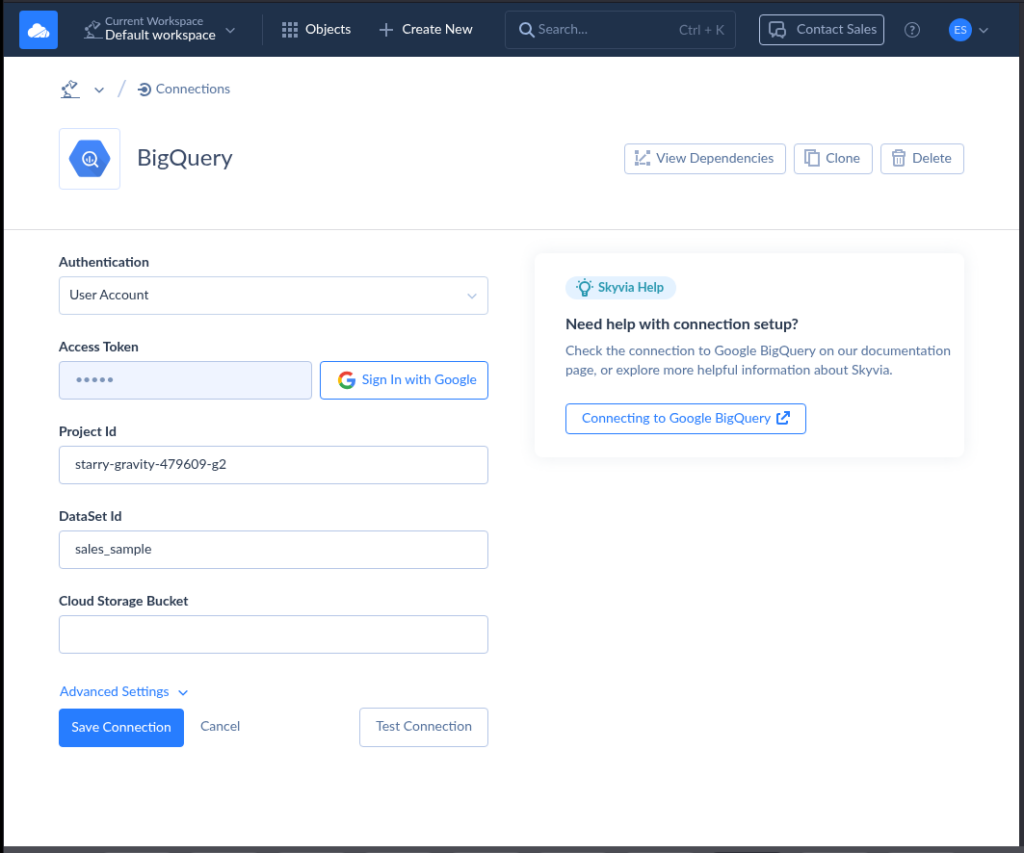
When I tried this myself, it only took less than 2 minutes to setup a Skyvia BigQuery connection – given I already have the Project and Dataset IDs. Note that this is the same Project and Dataset IDs used in the BigQuery screenshot earlier.
How about the MCP Endpoint? Here’s a sample using the above connection:
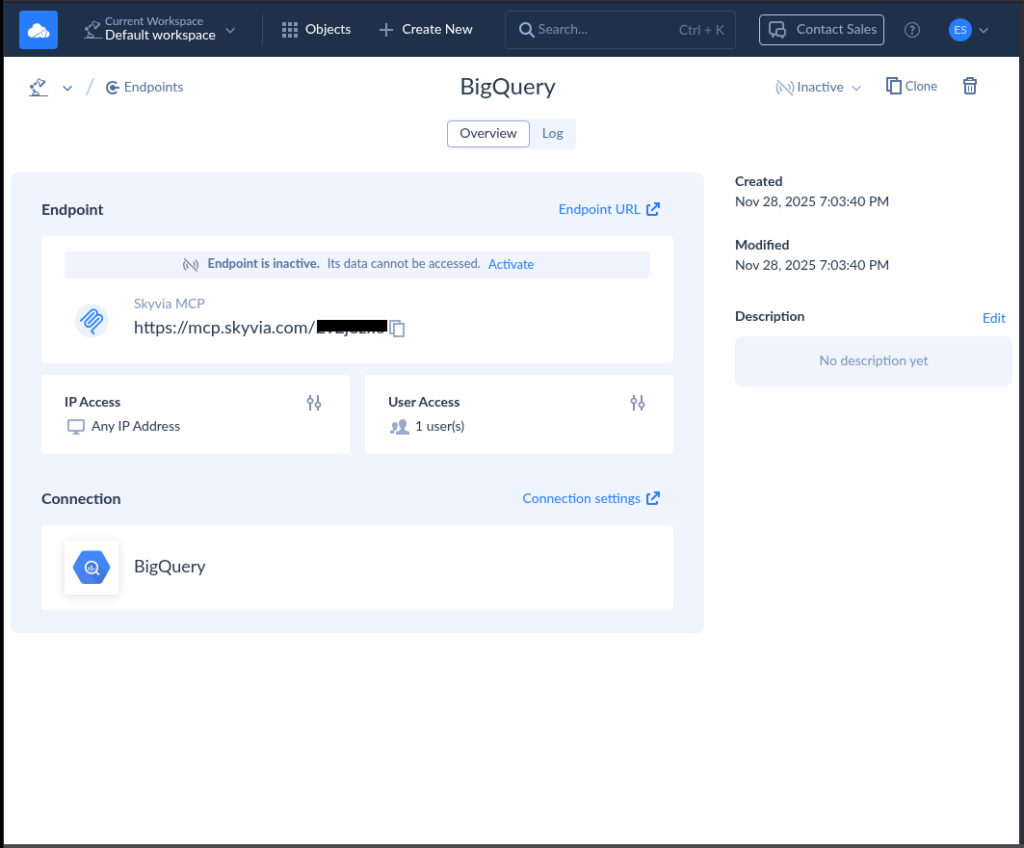
Isn’t it very straightforward? You can do this in 3 minutes or less.
At this point, you can configure the MCP client like Claude Desktop to talk to this BigQuery MCP server. You can get the details on how to do that from here.
4. Managed and Secure
You don’t need to set up logging. Skyvia takes care of that. You only need a Google Access Token (You sign-in to Google, and Google will provide the access token) and your Project and Dataset IDs. Then, your allowed IP addresses and user credentials.
Notice the sample Skyvia MCP Endpoint earlier. It has a section for Logs, IP Access, and User Access.
Not only that, Skyvia supports workflows aligned with GDPR, HIPAA, and PCI-DSS requirements.

Practical Use Case: Answering Business Questions with AI and BigQuery
Let’s say you’re a sales manager. You want to know the top-performing products for the last quarter. Without MCP, this will happen:
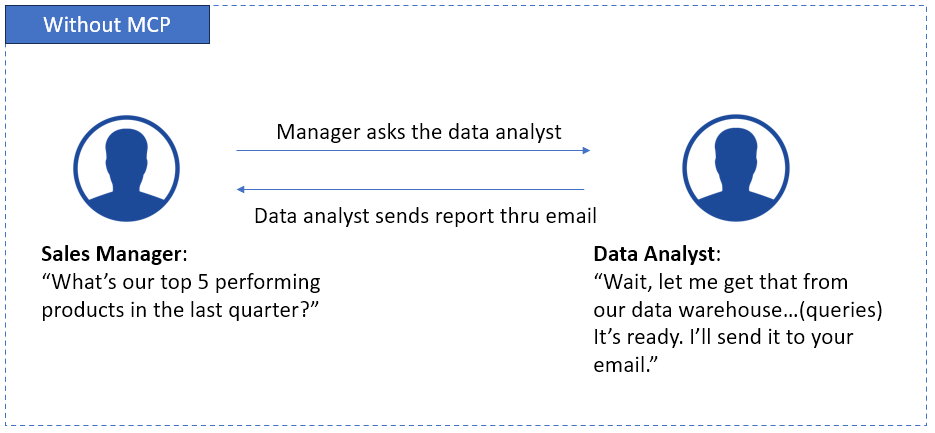
We’ve seen the above scenario before. That’s how it was in pre-MCP days. You ask a technical person, usually a data analyst, to give you a report of what you want out of a database or warehouse.
But with a BigQuery MCP Server like Skyvia’s MCP Endpoint, it becomes like this:
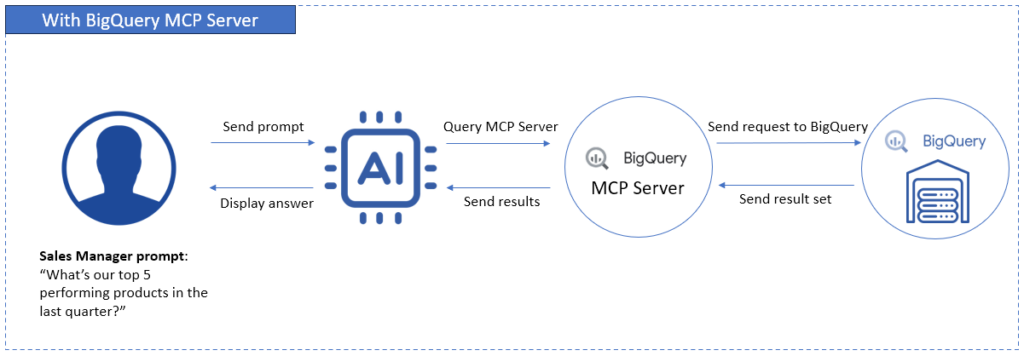
Very convenient, isn’t it? The AI translates the question to SQL, gets the data, and provides the answer in seconds.
And it doesn’t end there. The sales manager can add follow-up questions, and AI will give it through the MCP server. No more back-and-forths to a tech person. The technical guy (that’s you) can now focus on improving the BigQuery MCP server for more features.
Amazing!
The next section will give you a glimpse of the future where data analysis is conversational.
The Future of Conversational Data Analysis
We just love conversations with nice people. What if we take that conversation to AI for data analysis?
So instead of crafting SQL statements, you just ask. You can type, or you can talk – whichever suits you. You can ask something like “Which store is underperforming for the last quarter?” or “What products have below sales expectations?” Then, AI answers back in plain language or with charts and tables. Then, you can make follow-up questions – just like a conversation.
Large Language Models (LLMs) are the engines that made this possible. They can understand context, translate questions into SQL, and explain results in everyday words. The dashboard becomes a dialogue. It also lowers the barrier for non-technical teams like marketing, finance, and operations.
MCP is impressive – and also practical. Instead of letting an AI guess, MCP gives it controlled, structured access to real systems like BigQuery. This opens the door to:
- Near real-time insights using natural language, depending on your pipeline.
- Self-service analytics without SQL skills
- Faster, AI-assisted decision-making
- Embedded analytics inside chat tools and apps
Before MCP became a thing, it seems that data was in a locked room for non-technical users. SQL is the key to unlock that door. But now with MCP and AI, you just “knock”.
With this, the future is no longer a comprehensive, static dashboard. It’s a clearer conversation with AI and MCP.
Conclusion
A BigQuery MCP server turns your data warehouse into something you can actually talk to. It removes the friction of SQL and opens the door for faster, smarter questions from anyone on the team.
Yes, you can build it yourself. But that road takes time, setup, and ongoing care. For many teams, a managed option like Skyvia is the smoother path. Less overhead. More focus on insights.
If your goal is simple, secure, AI-driven access to BigQuery, this is your moment. Ready to skip the setup hassle? Explore Skyvia’s MCP endpoint and start your free trial today.

F.A.Q. for BigQuery MCP Server

What are the main benefits of using an MCP server with BigQuery?
Easier access, faster answers, better security control, and fewer costly query mistakes.
Do I need coding skills to connect an AI to my BigQuery data?
Not always. Some tools offer no-code or low-code setups for quick connections.
Is it safe to connect an AI to my company’s BigQuery data warehouse?
Yes, if you use read-only access, strong authentication, and proper permissions.
Can I use an MCP server to connect AI to databases other than BigQuery?
Yes. Many MCP servers support SQL Server, PostgreSQL, MySQL, and more.
What kind of AI tools or agents can use MCP?
LLM-powered apps like Claude, Cursor, IDE copilots, and AI chat interfaces.